Trading Journal Template for Crypto Perps: Fees, Funding
Trading journal template for crypto perps: columns for venue, fees, funding, leverage and liquidation price, a worked net P&L example and a weekly review.
Published 9 min read
On this page
- Key takeaways
- Why perps need more columns than spot
- The template: fields to log per trade
- Identity
- Risk at entry
- Exit and result
- Context
- Logging funding and fees separately
- Worked example
- Filling it from venue exports
- Weekly review questions
- Common journal mistakes
- Where your data and funds sit
- Sources
- Frequently asked questions
- How do I journal trades across multiple exchanges in one spreadsheet?
- How should I log a hedge split across two exchanges?
- What common journal mistakes hide real losses on perps?
- How often should I review a trading journal, and what should I look for?
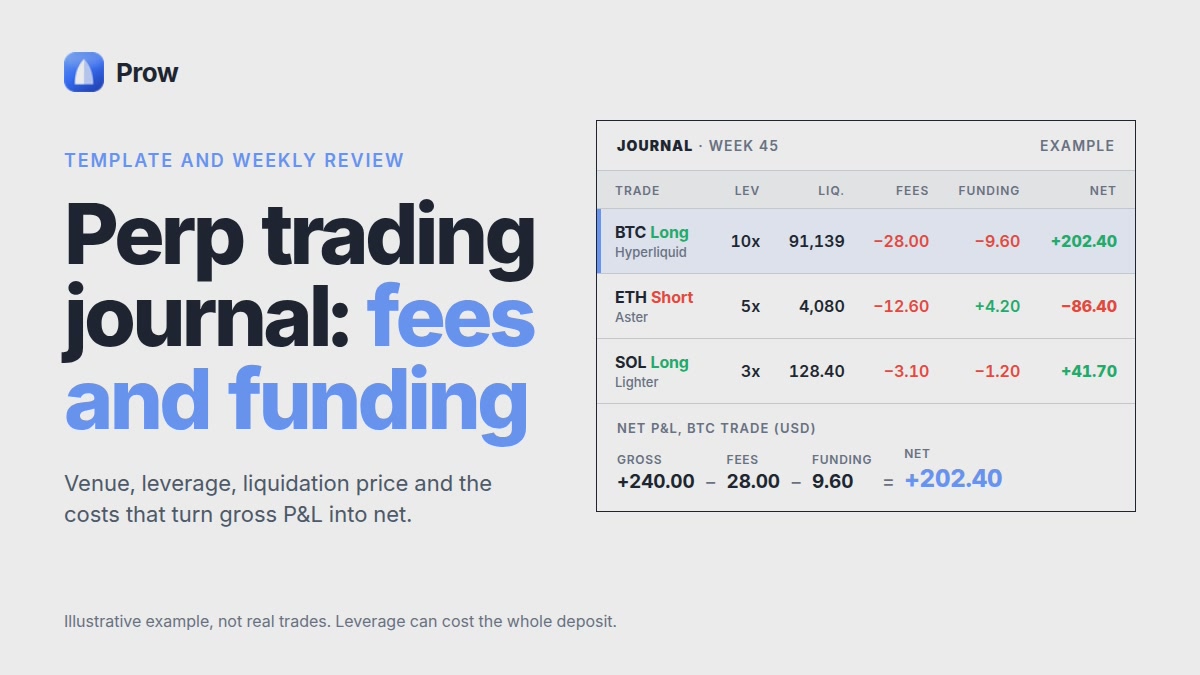
A trading journal template for crypto perps needs more columns than a stock or forex sheet. It should record the venue, maker or taker on each side, entry and exit fees, funding paid or received, leverage and margin mode at entry, and the liquidation price. With those fields, your net result is price P&L minus fees, plus or minus funding, logged per trade and per venue. This guide lists the columns, shows a worked example, maps venue exports to the sheet and gives a weekly review routine. A journal records what happened. It does not predict prices or make any method profitable.
Key takeaways
- A perp trade's net result is price P&L minus entry and exit fees, plus or minus the funding paid or received while the position was open.
- Leverage, margin mode and liquidation price should be written down at entry, because they cannot be reliably reconstructed afterwards.
- Funding should be logged as the sum of actual payments from the venue's history, not as the rate shown when you opened the position.
- Hyperliquid's API returns at most 2,000 fills per response and only the 10,000 most recent fills, so older trades should be exported before they drop out of reach.
- In Prow, funds stay in your Hyperliquid, Aster or Lighter account, and each venue's own history is the source of truth for the journal.
Why perps need more columns than spot
A perp result depends on fees and funding as well as price, and a spot-style sheet has no place for either. It also leaves out the leverage and margin mode that set how close liquidation was.
Three things separate a perp trade from a spot trade in the record:
- Funding. Positive funding means longs pay shorts. Negative funding means shorts pay longs (Aster funding docs). On a multi-day hold this can be larger than the fees.
- Liquidation risk. Leverage and cross or isolated margin decide how far price can move against you. Log both at entry, not from memory afterwards.
- The venue. The same BTC trade carries a different fee schedule, funding rate and funding interval on Hyperliquid, Aster and Lighter. Without a venue column you cannot compare them. The Hyperliquid vs Aster vs Lighter comparison sets out how they differ.
The journal is a record. It shows where costs and risk came from. It is not a signal and does not make a strategy work.
The template: fields to log per trade
One row per position, from open to full close. Partial fills and partial closes roll up into that row.
Identity
- Open date and time (UTC)
- Venue (Hyperliquid, Aster, Lighter)
- Market (for example BTC-PERP)
- Side (long or short)
- Order type on entry and on exit
- Maker or taker on entry, maker or taker on exit
Risk at entry
- Size and notional value
- Leverage
- Margin mode (cross or isolated)
- Entry price
- Liquidation price shown by the venue
- Distance to liquidation, in %
The perp liquidation price calculator guide shows how to check the venue's number.
Exit and result
- Exit price
- Exit reason: TP, SL, manual or liquidation
- Holding time in hours
- Entry fee, exit fee, funding total, net result
Context
- One-line plan, written before entry
- One-line note, written after exit
Logging funding and fees separately
Log fees as two numbers and funding as one signed total. Keep them in separate columns from price P&L.
- Fees. Record the entry fee and the exit fee separately. Note the fee tier and any builder fee, with the venue's fee schedule and the date you checked it. Prow's perp DEX fees page compares maker, taker and builder fees.
- Funding. Sum the payments from the venue's history over the holding period. Hyperliquid's funding history uses the sign convention: "Positive values indicate received funding, negative values indicate paid funding" (QuickNode, Jun 15, 2026). Keep that sign in the sheet.
Why actual payments and not the entry rate: rates change every interval, and on Hyperliquid "funding settles on the oracle (spot) price, not the mark price" (Dwellir, June 11, 2026).
Worked example
The figures below are illustrative inputs, not current venue figures. A BTC long of $10,000 notional is held for 72 hours.
- Price P&L: +0.15% = +$15.00
- Entry fee at an assumed 0.05% taker rate: −$5.00
- Exit fee at 0.05% on $10,015: −$5.01
- Funding at 0.00125% an hour, paid by the long: $10,000 × 0.00125% × 72 = −$9.00
Net result = 15.00 − 5.00 − 5.01 − 9.00 = −$4.01. The price moved in your favour and the trade still lost money.
The 0.00125% hourly figure is the fixed interest component Dwellir describes for Hyperliquid (as of June 11, 2026). Multiplied by 8,760 hours, it is 10.95% simple APR. Use APR for reference only. Live hourly and APR rates by venue are on Prow's funding rates page, and you should write down the date and time you read them.
Filling it from venue exports
Pull trades, funding and fees from each venue's own history. Then map them to journal columns and normalize the time and currency. Check what each source actually includes. The notes below were checked against the documents dated or listed here, as of November 2026.
- Hyperliquid. The info endpoint returns "at most 2000 fills per response and only the 10000 most recent fills are available", and time-range queries "will only return 500 elements or distinct blocks of data" (Hyperliquid Docs). Export regularly. Query the master or sub-account address: "A common pitfall is to use an agent wallet's address which leads to an empty result."
- Aster. Funding "will be deducted from your Perps Account balance", and "There is a 15-second deviation between the actual time and when the funding fee is charged" (Aster docs). Match funding to positions by time window, not by the exact second. Third-party indexers may not help: Bitquery notes order-book "Orders, fills, positions, funding and liquidations" are not available through it (Bitquery).
- Lighter. Use Lighter's own trade and funding history, and confirm which fields it exports before you build the mapping.
Mapping rules:
- Merge partial fills into one row with a size-weighted average price.
- Sum funding per position.
- Convert all times to UTC.
- Note the settlement asset per venue.
Weekly review questions
Review once a week, at a fixed time, using the same questions. The questions cover cost, risk and venue choice, and the review sets no return targets.
- Cost: What share of gross price P&L went to fees and funding, per venue? What share of volume paid taker rates?
- Risk: What was the smallest liquidation distance at entry? Was any position liquidated or close to it? Were alerts set? On Aster, if the account balance cannot cover funding, "fees may be taken from your position margin, potentially impacting your liquidation price". Check for that.
- Venue: For the same market, how did fees, funding and liquidity compare this week? Check the perp markets page and note the date.
- Process: Did each trade match its pre-entry plan line? Write down one rule to keep or change.
Common journal mistakes
Most journals that hide real losses do it by leaving columns out, not by getting the math wrong.
- Logging only price P&L. This hides fees and funding on multi-day holds.
- Recording leverage after the fact, or skipping margin mode. Liquidation risk then cannot be reconstructed. See max leverage and liquidation risk.
- Mixing venues in one row. A hedge split across two venues is two positions with two margins and two liquidation prices, so it needs two rows (hedge guide).
- Copying funding rates without a date or source.
- Treating one good week as proof of a method.
Where your data and funds sit
The journal is your own file. Your collateral stays in your venue accounts. Prow does not hold funds: they remain in your Hyperliquid, Aster or Lighter account. Prow's single list of positions and orders shows the venue on every row, which helps you match journal rows to venue records.
The trading key is worth a row in your journal too, as an access record rather than a trade. Log three things:
- Date connected. The key is made when you connect a venue. Your wallet signs once to approve it. That signature costs no network fee and moves no funds, so there is no transaction to reconcile.
- Expiry date. Add 180 days to the connection date. After that the key stops working and you reconnect. A dated row means a stopped bot or a failed order near that date has an obvious first suspect.
- Device. The key is encrypted and kept only on the device that created it. Prow's servers never receive it. If you trade from a phone and a laptop, note which device holds which key.
The key's scope affects your risk review. It can place and cancel trades, but it cannot withdraw. A lost device can open bad trades, but it cannot move collateral out of the venue. Still, leveraged positions opened by someone else can lose the whole deposit. If a device is lost or replaced, revoke the key at once and log the date. You can revoke it at any time.
The journal records that a key exists, never the key itself. Do not paste keys, seed phrases or wallet exports into a journal or a shared spreadsheet.
For first-trade walkthroughs, fees and funding mechanics, see the Prow guides.
Sources
- Funding Rate | Aster, Aster
- userFunding Info Endpoint Method | Hyperliquid Docs, QuickNode, Jun 15, 2026
- Hyperliquid Funding Rates: Hourly Formula and API | Dwellir, Dwellir, June 11, 2026
- Info endpoint | Hyperliquid Docs, Hyperliquid
- AsterDEX API: Deposits, Withdrawals and 1001x Trade History, Bitquery
Frequently asked questions
How do I journal trades across multiple exchanges in one spreadsheet?
Use one row per position and add a venue column for Hyperliquid, Aster or Lighter. Pull trades, funding and fees from each venue's own history, then convert times to UTC and use one currency. The venue column lets you compare fees and funding for the same market across venues.
How should I log a hedge split across two exchanges?
Log each leg as its own row with its own venue, side, leverage, margin mode and liquidation price. Each leg pays its own fees and funding, so record those separately. Add the two net results to see the combined outcome, but keep in mind that each leg has separate margin and can be liquidated on its own venue.
What common journal mistakes hide real losses on perps?
Typical mistakes are logging only price P&L, leaving out the entry or exit fee, and using the funding rate shown at entry instead of the payments actually made. Writing down leverage and liquidation price from memory after the trade is another. As the worked example shows, a trade can move in your favour and still lose money after fees and funding.
How often should I review a trading journal, and what should I look for?
The guide suggests a weekly review. Compare fees and funding with price P&L per trade and per venue, and check how close positions came to their liquidation price. The journal shows where costs and risk came from. It does not predict prices or make a strategy profitable.