Perp Liquidation Price Calculator: Formula and Examples
Calculate a perp liquidation price by hand: five inputs, long and short formulas, 10x vs 40x examples, and why the venue's number can differ.
Published 10 min read
On this page
- Key takeaways
- The inputs you need before you calculate
- The formula in plain words
- Worked example: an isolated long
- Worked example: the same trade as a short
- Why your number may differ from the exchange's
- How to check your figure against the venue
- Turning the number into a liquidation alert
- FAQ
- Does lower leverage make liquidation impossible?
- Can I use one calculator for all three venues?
- Which price triggers liquidation, mark or last?
- Sources
- Frequently asked questions
- What is maintenance margin in perpetual futures?
- Does adding margin move the liquidation price?
- What is the difference between isolated and cross margin for the liquidation price?
- Mark price or last price: which one triggers liquidation?
- Why is my liquidation price different from the calculator?
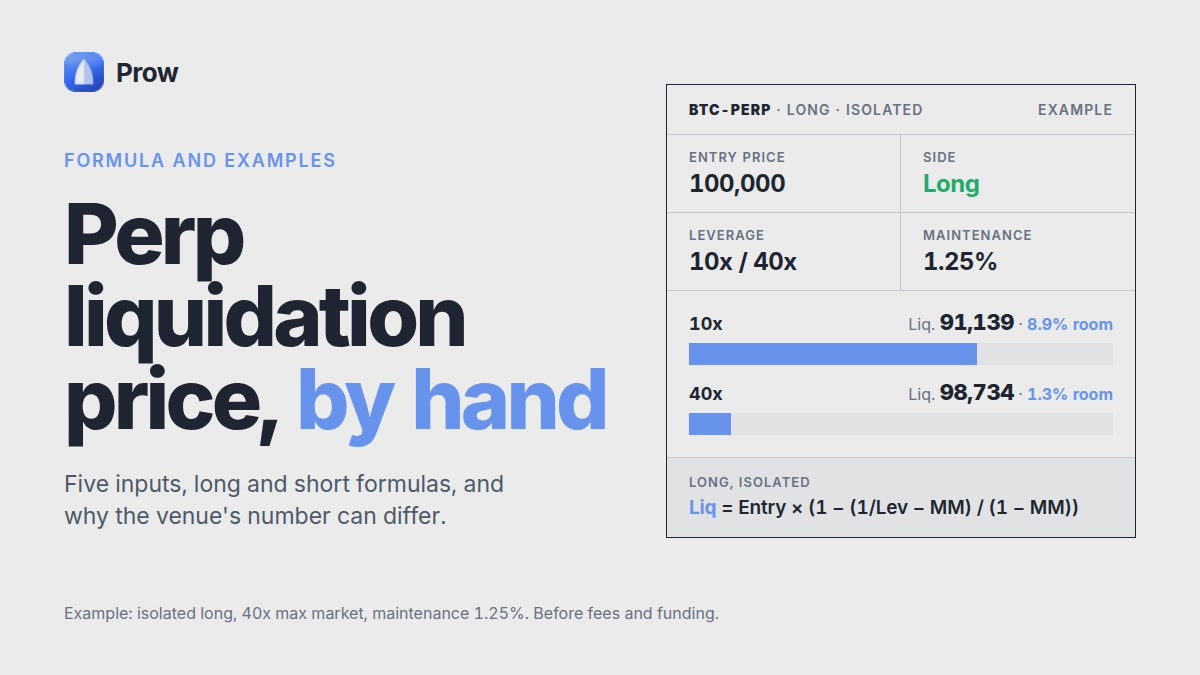
A perp liquidation price calculator needs five inputs: entry price, position size, side, the margin actually allocated to the position and the venue's maintenance margin rate. With Hyperliquid's documented formula, an isolated long on a 40x market with 1.25% maintenance has about 8.9% of room to liquidation at 10x and about 1.3% at 40x. The same short at 10x has about 8.6%. These figures are before fees and funding. If liquidation happens, the margin behind the position can be lost in full. This guide shows how to do the calculation by hand, how to check your result against the venue's own number and how to turn that result into an alert.
Key takeaways
- A liquidation price depends on entry, size, side, allocated margin and the maintenance margin rate, not on the leverage label alone.
- On Hyperliquid, maintenance margin is "notional_position_value * maintenance_margin_rate - maintenance_deduction", according to Hyperliquid's margin tiers docs (checked November 2026).
- At 10x on a 40x market with 1.25% maintenance, a long has about 8.9% of room and a short about 8.6%.
- Venues trigger liquidation at the mark price, which can differ from the last trade, so your number and the venue's number can diverge.
- An alert warns you before liquidation. It does not prevent it.
The inputs you need before you calculate
You need five numbers: entry price, size, side, allocated margin and the maintenance margin rate. If any one of them is wrong, the result is wrong.
- Entry price and size. Size here means the number of coins. Notional is size × price.
- Side. On a long, liquidation sits below entry. On a short, it sits above.
- Allocated margin. Use the collateral actually assigned to the position, not the leverage label. In isolated mode it is the position's own margin. In cross mode the whole account balance backs it.
- Maintenance margin rate. Take it from the venue docs. Hyperliquid's docs state: "For example, at 20x max leverage, maintenance_margin_rate = 2.5%." That is half the 5% initial margin at 20x. Applying the same rule, a 40x market uses 1.25%. The docs also note that rates "depend only on the margin tiers, not the asset" (checked November 2026).
Max leverage per market is listed on Prow's perp markets page.
The formula in plain words
A position is liquidated when its equity falls to the maintenance margin, measured at mark price. The formula solves for the price where that happens.
In plain terms, it works in three steps:
- Subtract the maintenance margin from your margin. The result is your buffer.
- Divide the buffer by size. This gives the price move the buffer can absorb.
- Adjust for the fact that maintenance changes as the notional moves.
As formulas:
- Long: liq = entry − (margin − maintenance) / size / (1 − maintenance rate)
- Short: liq = entry + (margin − maintenance) / size / (1 + maintenance rate)
This follows Hyperliquid's documented approach. For a single-tier market the maintenance deduction is zero. The docs state: "For IDs less than 50, there is a single tier with max leverage equal to the ID." Aster and Lighter publish their own maintenance rates and tiers. Use their docs before you plug in a number. The venue-specific formula and engine details are in Liquidation price on Hyperliquid and Aster, with examples.
Worked example: an isolated long
At 10x, the long below is liquidated about 8.86% under entry. At 40x, it is liquidated about 1.27% under entry. The setup is a 40x market with 1.25% maintenance, entry $100 and 10 coins, so the notional is $1,000.
At 10x (margin $100):
- Maintenance = $1,000 × 1.25% = $12.50
- Buffer = $100 − $12.50 = $87.50
- Per coin = $87.50 / 10 = $8.75
- Adjusted = $8.75 / (1 − 0.0125) = $8.861
- Liq ≈ $100 − $8.861 = $91.14, about 8.9% below entry
Check: at $91.14 the equity is about $11.39, and maintenance on $911.4 notional is also about $11.39.
At 40x (margin $25):
- Buffer = $25 − $12.50 = $12.50
- Per coin = $1.25
- Adjusted = $1.25 / 0.9875 = $1.266
- Liq ≈ $98.73, about 1.3% below entry
The position is the same size, but the room is about 7 times smaller. These numbers are before fees and funding.
Worked example: the same trade as a short
For the short, liquidation sits above entry. At 10x the room is about 8.6%, which is slightly less than the long's 8.9%. The inputs are the same: entry $100, 10 coins, $100 margin and 1.25% maintenance.
- Buffer = $87.50, per coin $8.75
- Adjusted = $8.75 / (1 + 0.0125) = $8.642
- Liq ≈ $108.64, about 8.6% above entry
At 40x the same steps give about $101.23, or 1.2% of room.
The short has less room because maintenance is a percentage of the current notional. When price rises against a short, the notional grows, so the maintenance requirement grows too. When price falls against a long, the notional shrinks and maintenance shrinks with it. As a result, the long's buffer stretches a little further than the short's.
Price also has no upper limit. A fast spike can carry a short through its liquidation price before you have time to react.
Why your number may differ from the exchange's
Your hand calculation is a snapshot. The venue recalculates continuously with live inputs. Most gaps come from one of these causes:
- Mark price. CoinDuck's guide to Hyperliquid notes the price reference is "the mark price, not simply the latest trade or an instantaneous book price" and that it "can differ materially from the book price during high volatility" (CoinDuck, August 28, 2026).
- Cross margin. In cross mode, other positions and their unrealized PnL share the same pool. Your leverage setting does not decide the liquidation price.
- Funding and fees. According to Quicknode (November 2, 2026), Hyperliquid funding is computed "on the position's full notional value at the oracle price, regardless of leverage". Inside the band it is 0.00125% per hour. On $1,000 notional that is about $0.30 a day, which reduces your equity when you are the side that pays.
- Tiers by size. On multi-tier markets, larger positions fall into tiers with higher maintenance rates.
- Engine rules. Partial liquidation and liquidation mechanics differ by venue.
As CoinDuck puts it, "Protocol rules can change, so check Hyperliquid's live documentation before relying on a specific parameter."
How to check your figure against the venue
Compare your result with the liquidation price in the order ticket before you place the order. If the two figures are close, your inputs match. If they differ a lot, one of your inputs is off.
A reconciliation checklist:
- Margin mode. Are you in isolated or cross mode? Cross mode will rarely match an isolated calculation.
- Allocated margin. Check the actual collateral on the position, not the leverage you selected.
- Maintenance rate and tier. Confirm the rate for your market and your size in the venue docs.
- Price reference. Compare against mark price, not last trade.
- Accrued changes. Recheck after a funding period, after adding margin or after changing size.
Adding margin to an isolated position increases the buffer and moves liquidation away. Adding size does the opposite. The Liquidation page in Prow Docs covers these adjustments.
If you trade on more than one venue, Prow shows each position in a single list with its venue and the venue's liquidation price. This lets you compare your figure with the venue's in one place.
Turning the number into a liquidation alert
Set the alert as a distance to liquidation, for example a percent from mark, rather than as a single price. A distance alert stays meaningful as funding, fees and mark price move the liquidation level.
Here is how to use your result:
- Take the room you calculated. In the 10x long example it is about 8.9%.
- Choose an alert distance that leaves time to act after a fast move. The right distance depends on your position and how you trade. It is not a fixed rule.
- Recalculate the room after any change to margin or size.
An alert does not prevent liquidation. Gaps and spikes can move price past your alert and your liquidation level within seconds. Liquidation alerts in Prow are fully supported on Hyperliquid. Check the docs for current support on other venues. Thresholds across DEXs are covered in Perp Liquidation Alerts.
Your funds stay in your own account on the venue. Prow's trading key is created in the browser, stored encrypted on your device and can be revoked at any time.
FAQ
Does lower leverage make liquidation impossible?
No. Lower leverage only moves the liquidation price further from entry. Any leveraged position can still be liquidated, and the margin behind it can be lost. Tier effects are covered in Max Leverage on a Perp DEX.
Can I use one calculator for all three venues?
Only if you use each venue's own maintenance rate, tiers and margin mode. The general formula stays the same, but the inputs differ by venue.
Which price triggers liquidation, mark or last?
On Hyperliquid it is the mark price, according to CoinDuck (August 28, 2026). Check each venue's docs for its rule.
Sources
- Margin tiers | Hyperliquid Docs, Hyperliquid
- How do liquidations actually work on Hyperliquid?, CoinDuck, August 28, 2026
- Hyperliquid Funding Rates: Formula and Examples | Quicknode, Quicknode, November 2, 2026
Frequently asked questions
What is maintenance margin in perpetual futures?
Maintenance margin is the minimum equity a position must keep. If equity falls to that level at mark price, the position is liquidated. On Hyperliquid it equals notional value times the maintenance margin rate, minus a deduction, and the rate is half the initial margin at the market's max leverage: 2.5% on a 20x market and 1.25% on a 40x market (Hyperliquid docs, checked November 2026).
Does adding margin move the liquidation price?
Yes. More allocated margin makes the buffer above maintenance larger, so liquidation sits further from entry. In the article's example, the same $1,000 long has about 8.9% of room with $100 of margin and about 1.3% with $25. A more distant liquidation price does not remove the risk: if liquidation happens, the margin behind the position can be lost in full.
What is the difference between isolated and cross margin for the liquidation price?
In isolated mode, only the margin assigned to that position backs it, so that is the number you put into the formula. In cross mode, the whole account balance backs the position, so the liquidation price depends on your total balance and your other positions. A calculation that uses only the position's own margin will not match the venue's figure in cross mode.
Mark price or last price: which one triggers liquidation?
Venues trigger liquidation at the mark price, not at the last traded price. During high volatility the mark price can differ noticeably from the order book, so a position can be liquidated even if the last trade never touched your calculated level. Use mark price when you compare your result with the venue's number.
Why is my liquidation price different from the calculator?
A hand calculation is a snapshot, while the venue recalculates continuously with live inputs. Common causes are mark price movements, a wrong maintenance rate or tier, cross margin instead of isolated, and fees and funding, which the article's examples leave out. Treat the venue's own figure as the reference, and use an alert to warn you, keeping in mind that an alert does not prevent liquidation.