Perp Liquidation Alerts: Set Thresholds Across DEXs
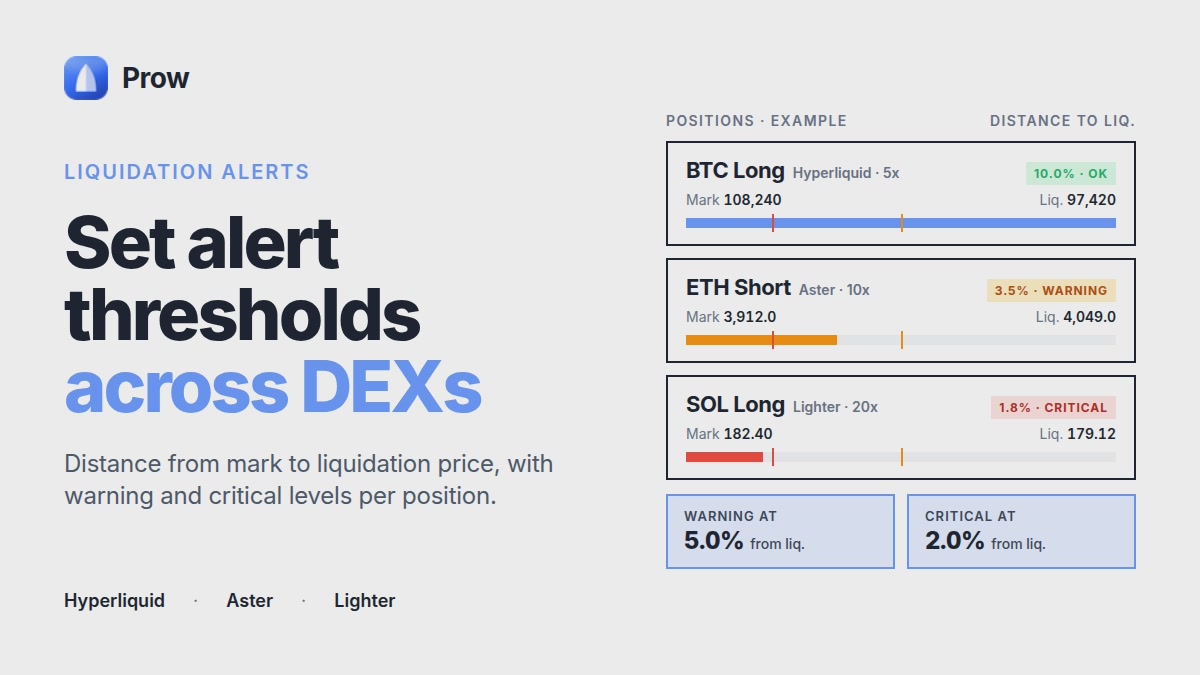
Perp liquidation alerts measure distance from mark to liquidation price. Set warning and critical levels per position on Hyperliquid, Aster and Lighter.
Published 9 min read
On this page
- What a liquidation alert tells you (and what it doesn't)
- Why mark price, not last trade
- Where the liquidation price comes from on each venue
- Venue figures: take them from the docs
- Choosing a distance threshold: a method, not a magic number
- Step 1: current distance
- Step 2: compare with the market's typical move
- Step 3: two levels
- Leverage shortens the runway
- Why one alert is not enough across several venues
- Setting up alerts in practice
- Reacting to an alert: add margin, reduce, or close
- Mistakes that make alerts useless
- Checklist before you rely on an alert
- Frequently asked questions
- Should a liquidation alert be based on unrealized loss or on distance to the liquidation price?
- Do I need to update my alert levels after adding margin or changing leverage?
- How often should I review my alert thresholds?
- Can a position be liquidated without my alert firing first?
- Does Prow hold my funds to send liquidation alerts across venues?
Perp liquidation alerts track one number: how far the mark price is from your position's liquidation price, as a percentage and in price units. They do not track your PnL. A useful alert threshold comes from your own position: compare the current distance to liquidation with how much the market usually moves. Set two levels, a warning and a critical one. If you hold positions on more than one venue, set alerts per position and per account, because Hyperliquid, Aster and Lighter each have separate margin, mark prices and liquidation rules. An alert is only a notice. It does not stop a liquidation, and leveraged trading can lose the whole deposit.
What a liquidation alert tells you (and what it doesn't)
The alert metric is the distance to liquidation:
- In price units: |mark price − liquidation price|
- In percent: |mark price − liquidation price| ÷ mark price × 100
For example, a long with mark price 100 and liquidation price 92 is 8 units or 8% away. Two positions can show the same unrealized loss and still sit at very different distances. Leverage, margin mode and maintenance margin are what set the distance.
Why mark price, not last trade
Venues use a mark price to decide liquidations, not the last traded price on their own order book. On Hyperliquid, the docs describe a mark price built from the oracle price and the venue's own book data. The point of this design is that one aggressive trade cannot trigger liquidations on its own. Aster and Lighter each define their mark price in their own documentation.
This has two practical effects:
- A wick on the chart of one venue may not move its mark price as far, so it may not trigger anything.
- The same asset can have slightly different mark prices on Hyperliquid, Aster and Lighter at the same moment. An alert set for one venue does not describe your position on another.
Where the liquidation price comes from on each venue
A position is liquidated when the margin backing it falls below maintenance margin, which is the minimum the venue requires to keep it open. The liquidation price is the mark price at which that happens. The formula and worked examples are covered in our guide to liquidation price on Hyperliquid and Aster, so this article does not repeat them.
Three things move the liquidation price after you open a position:
- Margin mode. In isolated margin, only the margin assigned to that position counts. In cross margin, the whole account is one pool, so other positions and their unrealized PnL move your liquidation price. A winning position elsewhere pushes it away. A losing one pulls it closer.
- Funding. Funding is a periodic payment between longs and shorts. On Hyperliquid it is paid every hour. Paying funding reduces your margin, so the liquidation price drifts closer even when the price stands still.
- Fees. Partial closes, added orders and similar actions pay trading fees, and those fees come out of margin.
Venue figures: take them from the docs
Maintenance margin rates and max leverage are set per market and change over time, so this article quotes no fixed numbers. Hyperliquid's docs state that maintenance margin equals half of the initial margin at the market's maximum leverage. Aster and Lighter publish their own tiers and rules. Before you calculate thresholds, open each venue's documentation for your market and write down the figure, the source page and the date you read it. For a quick view of current max leverage per market, the perp markets comparison updates about every minute. Still treat the venue as the source of truth.
Choosing a distance threshold: a method, not a magic number
The numbers below are illustrative only. They are not a recommendation and not real market data.
Step 1: current distance
Illustrative isolated long: mark price 100, liquidation price 91. The distance is 9 units, or 9%.
Step 2: compare with the market's typical move
Look at the market's recent typical move. One common choice is the daily high-low range over recent days. Say it averages 4% in this illustrative case. The position is then about 2.25 typical daily ranges from liquidation. That ratio is more useful than the raw percentage, because 9% means one thing for a calm market and another for a volatile one.
Step 3: two levels
- Warning: a distance where you still have time to decide. In this example, you might pick 1.5 daily ranges, which is 6%.
- Critical: a distance where you act on a plan you made earlier. In this example, 0.75 daily ranges, which is 3%.
These multipliers are placeholders. Choose your own based on how quickly you can respond, including at night.
Leverage shortens the runway
Run the same illustrative market with higher leverage. The liquidation price might sit at 96, a 4% distance, or one typical daily range. The warning level from Step 3 is already crossed when you open the trade, and an ordinary day's move covers the whole gap. Higher leverage leaves less distance and less time between the alert and liquidation.
Why one alert is not enough across several venues
Hyperliquid, Aster and Lighter are separate accounts. Each has its own collateral, mark price and liquidation engine. Margin does not move between them automatically.
Take a hedge with a long on one DEX and a short on another. That is two positions, and each can be liquidated on its own. If the price rallies hard, the short leg moves toward liquidation. Combined PnL can look flat while that leg is close to its liquidation price. After it is liquidated, you hold an unhedged long. The hedge guide for multiple DEXs covers this setup in more detail.
In practice:
- Set alerts per position and per account, never on combined PnL.
- For a cross-margin account, watch every position in it, because they share one margin pool.
Prow shows positions and orders from all connected venues in one list, with liquidation alerts for each. Funds stay in each venue's account. Prow does not hold them. See Prow: every perp DEX in one app.
Setting up alerts in practice
- Connect each venue. The trading key is created in the browser and confirmed once with your wallet. It is stored encrypted on your device, not sent to servers, expires after 180 days and can be revoked at any time.
- Cross-check the liquidation price. After opening a position, compare the price shown in the app with the venue's own interface. If they differ, find out why before you rely on the alert.
- Re-check after any change. Recalculate thresholds after you change size, leverage or margin mode, and after you add a position to a cross account.
- Test delivery. Check that notifications reach you on your phone and in the browser, and that quiet hours or focus modes do not block them.
The Prow Docs page on liquidation explains how the app handles this.
Reacting to an alert: add margin, reduce, or close
This is a framework for deciding in advance. It is not a trading recommendation.
| Action | Effect on liquidation risk | Trade-offs |
|---|---|---|
| Add margin | Moves the liquidation price away | More collateral is at risk in the venue account, and the loss can grow |
| Reduce size | Lowers the margin requirement | Pays trading fees and realizes part of the PnL |
| Close | Removes liquidation risk on that position | Pays fees and realizes the full loss or gain; a hedge leg closed alone leaves the other leg open |
Fees differ by venue and order type. Check the perp DEX fee comparison before you rely on partial closes as your plan.
Mistakes that make alerts useless
- Threshold too close. A critical level just above liquidation leaves no time to react.
- One venue or one leg only. The unwatched leg of a hedge is the one that gets liquidated.
- Ignoring drift. Funding and the PnL of other positions in cross move the liquidation price. Rates are listed on the funding rates page.
- Alert instead of sizing. An alert does not replace sensible position size or a stop loss. It only tells you something is happening.
Checklist before you rely on an alert
- [ ] Liquidation price confirmed on the venue and in the app
- [ ] Two thresholds set (warning and critical) per position, per venue
- [ ] Response plan written down: add, reduce or close
- [ ] Source and access date noted for every venue figure used
- [ ] Notifications tested on the device you actually carry
Frequently asked questions
Should a liquidation alert be based on unrealized loss or on distance to the liquidation price?
Base it on distance to the liquidation price. Two positions with the same unrealized loss can be very different in risk, because leverage, margin mode and maintenance margin set how close each one is to liquidation. A loss figure alone does not show how much room is left.
Do I need to update my alert levels after adding margin or changing leverage?
Yes. Adding margin, removing margin, changing leverage or switching between isolated and cross margin all move the liquidation price. Recalculate the distance after any of these changes and reset your warning and critical levels. Thresholds tied to the old liquidation price can fire too late or not at all.
How often should I review my alert thresholds?
Review them when market volatility changes noticeably, when you open or close other positions in a cross-margin account, and after funding has been paid over a long holding period. Each of these can change either your liquidation price or the size of a typical market move, which are the two inputs behind a threshold.
Can a position be liquidated without my alert firing first?
It can. Alerts are notifications, and price can move past the warning and critical levels before you see them or act, especially at high leverage or in fast markets. Delivery delays, a closed app or a phone on silent all reduce the time you have. Leveraged trading can lose the whole deposit regardless of alerts.
Does Prow hold my funds to send liquidation alerts across venues?
No. Your collateral stays in your own account on Hyperliquid, Aster or Lighter. Prow reads positions to show them in one list and send alerts. Its trading key is created in the browser, stored encrypted on your device, expires in 180 days and can be revoked at any time.