Trade Perps on Multiple DEXs in One App: Hedge Guide
Run perps on Hyperliquid, Aster and Lighter from one app: separate deposits, trading keys, per-order venue choice and why hedge legs liquidate separately.
Published Updated 8 min read
On this page
- Why traders split perps across Hyperliquid, Aster and Lighter
- What differs between the three venues: a dated fact table
- Setting up accounts and trading keys on each venue
- Choosing the venue for each order
- Worked scenario: a position on one venue, a hedge on another
- Tracking positions and orders in one list
- Common mistakes when splitting capital across venues
- Checklist before your first multi-venue trade
- Frequently asked questions
- If my long on one DEX is in profit, can that profit protect my short on another DEX from liquidation?
- Do I need a separate wallet for Hyperliquid, Aster and Lighter?
- What happens when a Prow trading key expires after 180 days?
- Is a long on one perp DEX and a short on another a risk-free hedge?
- How should I compare funding rates across Hyperliquid, Aster and Lighter?
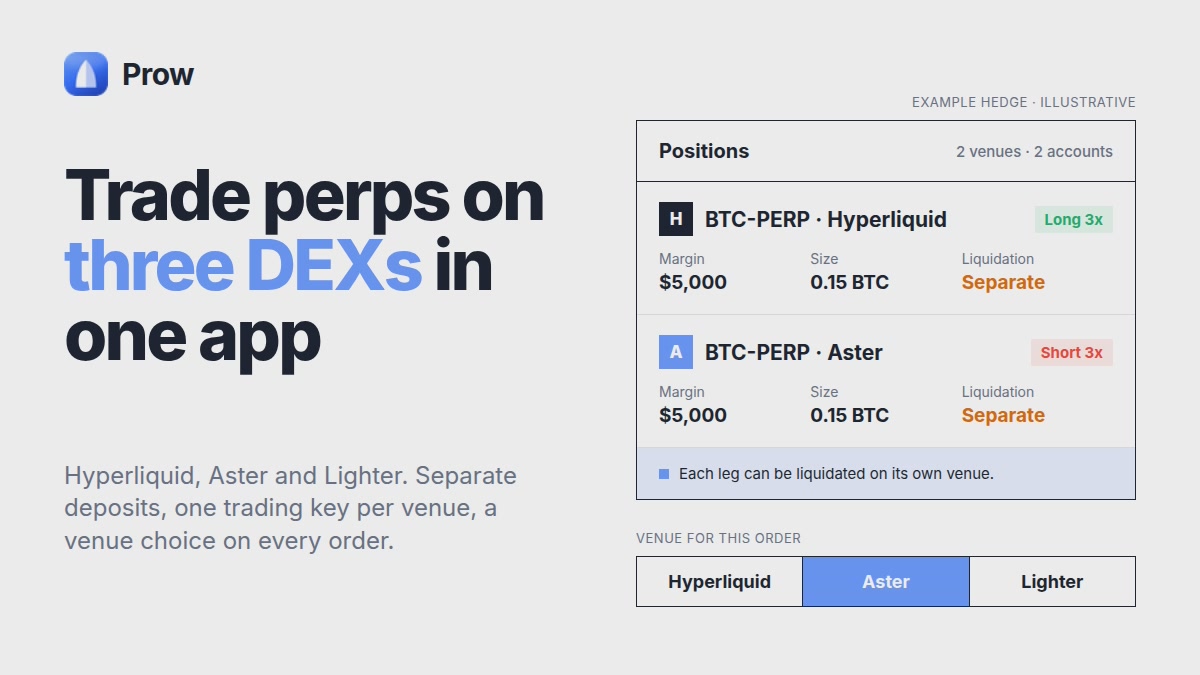
To trade perps on multiple DEXs from one app, you keep a separate account and deposit on each venue (Hyperliquid, Aster, Lighter). You connect a trading key for each one, then choose the venue order by order from a single interface. One screen gives you one list of positions and orders. It does not merge collateral, margin or liquidation. A long on one venue and a short on another are two independent positions, and either one can be liquidated on its own.
This guide walks through one concrete scenario: a position on one venue and a hedge on another. At each step it shows what changes between the three venues.
Why traders split perps across Hyperliquid, Aster and Lighter
The reasons are practical. Each one is a fact to check, not a reason to prefer a venue:
- Market availability. A pair may be listed on one venue and not another.
- Depth for your size. The same pair can have a thin book on one venue and a deeper one elsewhere.
- Fees. Maker and taker rates, fee tiers and any builder fee differ.
- Funding. Rates on the same pair often differ between venues at the same moment.
- Venue risk. Spreading capital limits exposure to any single platform's outages or rule changes.
The perp markets on Hyperliquid, Aster, Lighter page shows max leverage, volume, open interest and funding per venue. The data refreshes about every minute, so note the time you read it.
The trade-off: your capital, margin and liquidation risk are now split across three accounts. Leveraged trading on any of them can lose the whole deposit on that venue.
What differs between the three venues: a dated fact table
| Hyperliquid | Aster | Lighter | |
|---|---|---|---|
| Deposit route | USDC from Arbitrum | Per Aster docs | Per Lighter docs |
| Minimum to open account | Per venue docs | Per venue docs | $5 deposit |
| Funding interval | Hourly | Per market, see funding tool | See funding tool |
| Maker/taker fee | See fees page | See fees page | See fees page |
| Max leverage (BTC/ETH) | See markets page | See markets page | See markets page |
| Spot in Prow | Yes | Yes | No |
| Bots in Prow | Yes | Yes | No |
Sources: Prow's Hyperliquid and Lighter first-trade guides and Prow product information, as of 16 October 2026. Fees, funding and leverage change often. Some cells point to the live Prow fees, funding-rates and markets pages instead of a frozen number. Those pages refresh about every minute and show their own timestamp.
Two cost terms appear on every venue:
- Venue fee: what the exchange charges per fill, split into maker (resting limit order) and taker (order that fills immediately).
- Builder fee: an extra fee an app can add on top of the venue fee when it routes your order.
Prow's own fee is 0% through the end of 2026, per Prow's announcement at the time of writing. Venue fees still apply on every fill. Check the current terms in the app before trading.
Setting up accounts and trading keys on each venue
You can use one wallet for all three venues, but each venue needs its own deposit:
- Hyperliquid: deposit USDC from Arbitrum. The steps are in how to trade perps on Hyperliquid.
- Lighter: a $5 deposit opens the account. See how to trade perps on Lighter.
- Aster: follow the deposit route in Aster's own documentation.
Then you connect a trading key for each venue. In Prow the key works like this:
- It is created in your browser.
- You confirm it with your wallet once.
- It is stored encrypted on your device and is not sent to Prow's servers.
- It expires after 180 days.
- You can revoke it at any time.
Your funds stay in each venue's own account, and Prow does not hold them. The Lighter guide notes that a trading key cannot withdraw. Confirm the permissions for each venue in Prow Docs. For more on custody, read where your funds stay in non-custodial perp trading.
Choosing the venue for each order
Before you send an order, compare four things for that exact market:
- Fee for your order type. Use the maker rate if you will rest a limit order and the taker rate if you will cross the spread.
- Current funding, on the same basis (per hour or APR) and with its timestamp.
- Book depth for your size. Thin depth adds slippage that can exceed the fee difference.
- Max leverage on that market, which caps how much margin the position needs.
Order types, TP/SL options and margin modes (cross or isolated) can differ per venue. Check the order form before you place an order.
There is no venue that is cheapest in general. The answer changes with the pair, the size, the order type and the hour.
Worked scenario: a position on one venue, a hedge on another
The numbers below are illustrative placeholders, not any venue's actual rates. Replace them with dated figures from the fees and funding-rates pages.
The setup:
- Long $10,000 notional on venue A, taker fee assumed 0.04%.
- Short $10,000 notional on venue B, taker fee assumed 0.05%.
Fees for opening and closing both legs with taker orders (four fills):
- Venue A: $10,000 × 0.04% × 2 = $8
- Venue B: $10,000 × 0.05% × 2 = $10
- Total: $18, plus any builder fee and slippage
Funding. Assume the long on A pays 0.0010% per hour and the short on B receives 0.0005% per hour:
- Net cost: $10,000 × 0.0005% = $0.05 per hour, or about $1.20 per day
- The cost changes whenever either rate changes, and funding can flip sign on either venue
Here is how that plays out. Say each leg uses $1,000 isolated margin at 10x. If price rises about 10%, the short's $1,000 margin is gone. The venue liquidates it earlier than that, once margin falls to the maintenance requirement. Meanwhile the long on venue A shows roughly $1,000 of unrealized profit that cannot move to venue B automatically. After the liquidation you hold an unhedged long and have paid liquidation costs on the short.
Calculate each leg's liquidation price separately. The liquidation price guide for Hyperliquid and Aster shows the formula and worked examples.
Tracking positions and orders in one list
The single list shows positions and open orders from every connected venue, each labeled with its venue. Liquidation alerts are set per position. They matter more when margin is spread out, because you no longer watch one account balance.
What one screen does not do:
- It does not share or move collateral between venues. You top up each venue separately.
- Spot trading is available only on Hyperliquid and Aster.
- Bots run only on Hyperliquid and Aster.
- Cross-DEX arbitrage can only be backtested for now.
These limits are as of October 2026. Check Prow Docs for the current state.
Common mistakes when splitting capital across venues
- Treating a cross-venue hedge as risk-free and leaving one leg thinly margined.
- Comparing funding on different bases, such as an hourly rate on one venue against an APR on another, without converting them first.
- Counting fees on only one leg, or forgetting the builder fee and slippage.
- Letting a trading key expire mid-position. Note each key's 180-day expiry.
- Leaving keys active on a lost or shared device. Revoke them.
Checklist before your first multi-venue trade
- [ ] Deposit confirmed on each venue you will use.
- [ ] Trading key active for each venue, with its expiry date noted.
- [ ] Fees, funding and max leverage checked for the exact market, with the data timestamp.
- [ ] Liquidation price calculated for every leg separately.
- [ ] Liquidation alerts enabled for every position.
- [ ] A plan to top up or close each leg on its own venue.
- [ ] Accepted that the full deposit on each venue can be lost.
Nothing here is a trade recommendation. Perpetual futures with leverage carry a real risk of losing your entire margin on each venue.
Frequently asked questions
If my long on one DEX is in profit, can that profit protect my short on another DEX from liquidation?
No. Each venue holds its own collateral and calculates its own margin and liquidation price. To add margin to a losing leg, you have to put more funds into that venue's account yourself. A withdrawal and a new deposit take time and can involve network or venue fees, so plan margin for each leg separately. Each leg can still lose its whole margin on its own venue.
Do I need a separate wallet for Hyperliquid, Aster and Lighter?
No. One wallet can be used for all three venues. Each venue still needs its own deposit and its own trading key connected in Prow. Funds stay in each venue's account, and the keys are stored encrypted on your device.
What happens when a Prow trading key expires after 180 days?
The key stops working for that venue. You create a new one in the browser and confirm it with your wallet once. Your positions and funds stay in the venue account during this time. If you lose the device or suspect a problem, you can revoke the key earlier.
Is a long on one perp DEX and a short on another a risk-free hedge?
No. You pay fees on every fill, and you may also pay a builder fee and slippage. Funding on the two venues can differ or change sign. Each leg can be liquidated on its own, and an outage or rule change on one venue affects only that leg. Leveraged positions on either venue can lose the whole deposit placed there.
How should I compare funding rates across Hyperliquid, Aster and Lighter?
Put both rates on the same basis, either per hour or APR. Check each venue's funding interval: Hyperliquid pays hourly, while other venues may differ by market. Note the timestamp of each rate. Prow's funding-rates tool shows these figures side by side and refreshes about every minute.