Non-Custodial Perp Trading: Where Your Funds Stay
How non-custodial perp trading works on Hyperliquid, Aster and Lighter: where collateral sits, who signs what, and how to verify it yourself.
Published Updated 14 min read
On this page
- What custody means for perp traders
- Where your collateral sits on each venue
- Hyperliquid
- Aster
- Lighter
- Venue-level risk applies in every case
- Step-by-step: the path of your funds
- Step 1: Deposit
- Step 2: Trading
- Step 3: Withdrawal
- What Prow can and cannot access
- Custodial vs non-custodial perp apps compared
- What differs between the three venues
- Risks that remain with you
- How to verify custody yourself
- Summary
- Frequently asked questions
- Does Prow hold my collateral?
- Can a trading key withdraw funds?
- What risks remain when trading non-custodially?
- How do I confirm that a revoked signer no longer works?
- What happens to my positions if Prow is unavailable?
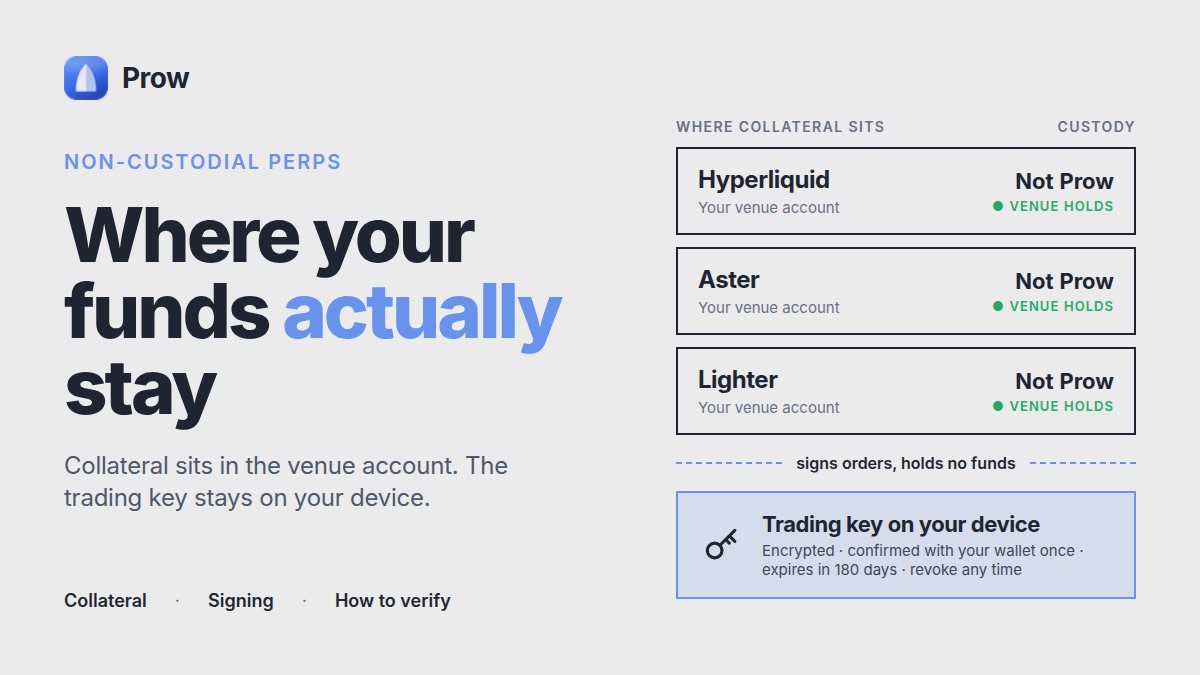
Non-custodial perp trading means your collateral stays in your account on the venue (Hyperliquid, Aster or Lighter), and the app only sends orders signed by a limited trading key. Prow does not hold your collateral. Deposits go from your wallet to the venue, and withdrawals go from the venue back to an address you control. The trading key can place, modify and cancel orders, but it is not the key that authorizes withdrawals. This article traces that path step by step, shows what the app can and cannot reach, and gives you a way to check it without taking our word for it.
What custody means for perp traders
Custody comes down to two questions: who holds the funds, and who can move them.
- Custodial: the platform holds the balance. You hold an account claim, and the platform decides whether and when a withdrawal is processed.
- Non-custodial: you keep control of the signing keys. Funds sit in an account on the venue's own infrastructure, and moving them requires a signature from the account owner.
A common misreading is that non-custodial means the funds sit in the app. They do not. In a non-custodial perp app, the app is a client. It builds orders, shows positions and sends signed requests to the venue. It is not a vault.
There is also a second layer. The venue itself holds your collateral in its contracts or its chain state. So "non-custodial" describes your relationship to the app, not an absence of venue risk.
Where your collateral sits on each venue
The three venues differ in architecture, and those differences decide what a delegated key can do and what you can still do if an app is unavailable. This section is based on each venue's public documentation. Docs read on: [insert date of check before publishing]. Chain lists, fees and API schemes change, so treat anything below without that date as unverified. We have not exercised the venues' emergency exit paths ourselves, and the text says so where it matters.
Hyperliquid
Hyperliquid runs its own chain. Trading collateral (USDC) sits in your account on that chain, tied to your wallet address. You fund it by bridging USDC from Arbitrum. The docs set a 5 USDC minimum deposit, and amounts below it are not credited. Withdrawals go back to Arbitrum and cost a flat 1 USDC, according to the docs.
- Who signs what: the owner wallet signs deposits, withdrawals and agent approvals. An approved agent (API) wallet can sign trading actions such as placing and cancelling orders. It cannot sign withdrawals.
- If an interface is unavailable: your balance and positions are account state on Hyperliquid's chain. Connecting the same wallet to Hyperliquid's own web interface shows them, regardless of which app you used to trade.
Details are in Hyperliquid agent wallets: why a trading key can't withdraw.
Aster
Aster is a multi-chain venue. Its documentation has described deposits from BNB Chain, Ethereum, Arbitrum and Solana, but the supported list has changed over time, so confirm it in the deposit dialog before you send funds. Collateral is credited to your Aster account and held there, not in the app you trade from.
Aster's API docs describe two authentication styles:
- API key and secret. This is a Binance-style scheme where requests are signed with an HMAC secret.
- Wallet-based API. Requests carry the main wallet address (the user) and a separate signer address (the API wallet), plus a nonce and an EIP-712 signature.
In both cases the signer is created and managed from the account's API management page while connected with the owner wallet. A delegated signer is meant for trading calls such as placing and cancelling orders and reading account state. Withdrawals are initiated from the owner wallet in Aster's interface. We could not find a published statement of the exact permission list for every signer type, so do not assume it.
To revoke a signer, remove it from the API management page. Then confirm it worked: send one authenticated read request with the removed signer and check that it is rejected. We have not verified how Aster behaves if its web interface is down, and the docs we reviewed do not describe a user-run exit path.
Lighter
Lighter is a zero-knowledge rollup settling to Ethereum. You deposit USDC from your Ethereum wallet, and the balance is tracked in your Lighter account on the rollup.
- API keys: the public key is registered to your account through a transaction signed by your wallet. The private key stays with the client. Each key is addressed by an index, and registering a new public key at the same index replaces the old one. That is the rotation and revocation mechanism.
- Permissions differ from Hyperliquid. The Lighter SDK exposes withdrawal calls through the same signer client that places orders. Do not assume "API key" means "cannot withdraw" on Lighter, because that guarantee is specific to Hyperliquid's agent wallets. What Prow's key can do on each venue is covered in Trading keys and safety in Prow Docs.
- If the interface is unavailable: Lighter's documentation describes an Ethereum-level exit mechanism for the case where the operator stops processing transactions. It is a design feature of the rollup, and we have not tested it.
Venue-level risk applies in every case
Whichever app you use, you remain exposed to the venue's smart contract risk, bridge risk and operational risk (outages, pauses, parameter changes). Using Prow instead of a venue's own web interface does not remove these. It also does not add them.
Step-by-step: the path of your funds
Step 1: Deposit
You send funds from a wallet you control to the venue. On-chain, this is a transfer to the venue's bridge, contract or account system, and you sign it with your wallet. The funds do not pass through Prow. Afterwards, the balance appears in your venue account.
Step 2: Trading
The app sends trading instructions signed by a trading key. The key authorizes order placement, modification and cancellation. Collateral does not move to Prow. It stays in the venue account, and the venue's matching engine applies margin, fees and funding to it.
The trading key is stored on your device. For the key types Prow uses and how they are stored, see Trading keys and safety in the docs.
Step 3: Withdrawal
A withdrawal goes from the venue to a wallet address you control. It is authorized by the account owner (your main wallet signature, as the venue's rules define it), not by the trading key. If a venue's rules allowed a delegated key to withdraw, that would change the picture. So you should confirm, per venue and per date, that the delegated key type in use cannot do this.
What Prow can and cannot access
What the app can do through a trading key, within the key's permissions:
- Place, modify and cancel orders
- Read account state such as balances, positions and open orders
- Display funding, fees and liquidation levels
What the app cannot do, as long as the venue restricts trading keys from withdrawals:
- Withdraw collateral to an address of its own
- Use your seed phrase, because Prow does not hold it
- Use your owner private key, because Prow does not hold it
The second list depends on each venue's rules, and venues can change them. That is why the self-check below matters. For product-level details, see Prow Docs.
Custodial vs non-custodial perp apps compared
Three rows separate custodial platforms from a non-custodial app like Prow. The more useful comparison is venue by venue, because the answers differ.
| Question | Custodial platform | Non-custodial app (Prow) |
|---|---|---|
| Who can freeze access to funds? | The platform | The venue, under its own rules. The app has no withdrawal ability. |
| If the app shuts down | Depends on the platform's solvency and process | Funds stay in your venue account. Connect the same wallet to the venue's own interface. |
| Account recovery | Often via support and identity checks | Your responsibility: wallet backup and key hygiene. No support desk can restore a lost owner key. |
What differs between the three venues
Docs read on: [insert date of check before publishing]. Confirm each cell against the venue's current docs.
| Hyperliquid | Aster | Lighter | |
|---|---|---|---|
| Where collateral sits | Your account on Hyperliquid's own chain | Your Aster account, funded by on-chain deposits | Your account on a zk rollup settling to Ethereum |
| Key that signs a withdrawal | Owner wallet. Agent wallets cannot withdraw. | Owner wallet, initiated in Aster's interface | Check the permission scope of the specific API key. The SDK exposes withdrawal calls. |
| Withdrawal cost and timing | Flat 1 USDC fee to Arbitrum, per docs. Timing is not guaranteed. | Depends on the chain you withdraw to. We did not find a fixed figure to quote. | Depends on the rollup's processing and proof cycle. We did not find a fixed figure to quote. |
| Revoking the trading key | Replace or deregister the agent wallet in the venue's flow | Remove the signer on the API management page, then test with a read request | Register a new public key at the same index |
| After Prow is disconnected | Positions and balance visible in Hyperliquid's own interface | Positions and balance visible in Aster's own interface | Positions and balance visible in Lighter's own interface |
Two points apply to all three venues. First, removing Prow from your device does not by itself revoke a key you authorized on the venue. Assume the authorization persists until you revoke it or it expires, and check the venue's own interface. Second, the exit paths in a worst case (venue outage or operator failure) differ by design and are not equally documented. The table says "we did not find" where the docs gave nothing to quote.
The trade-offs are real. A custodial platform may offer simpler recovery if you lose credentials. A non-custodial setup puts recovery on you. Neither model removes market risk.
Risks that remain with you
Non-custody changes who can move your funds. It does not change what leveraged trading can do to them.
- Liquidation, with numbers. Take a hypothetical 10x long on BTC: 1,000 USDC of isolated margin, a 10,000 USDC position, entry at 100,000, size 0.1 BTC. Hyperliquid's docs set the maintenance margin rate at 1 / (2 × the market's max leverage). For a market with 20x max leverage, that is 2.5%. The maintenance margin is about 250 USDC at entry. Margin available before liquidation is therefore about 750 USDC. The liquidation price is roughly 100,000 − 750 / 0.1 / (1 − 0.025) ≈ 92,308, a drop of about 7.7%. At that price the position is closed and the remaining margin (about 230 USDC) goes to the liquidation process rather than back to you. This is an illustration, not a prediction. It leaves out fees and funding, and the max leverage depends on the market, so check it on the venue. In a fast market the price can pass the liquidation level before the close executes, and the loss can be larger.
- Funding keeps running. On Hyperliquid, funding is paid hourly, per the docs. If an interface is down, an open position still accrues funding and still carries liquidation risk, and you may be unable to close it through that interface.
- Venues act under their own rules. In March 2025, Hyperliquid validators voted to delist the JELLY perpetual and settle it at a price they set, after a large position moved against the venue's liquidity vault. That was a venue-level decision. Neither an app nor a non-custodial setup gives you a say in it. Read the venue's announcements for the details.
- Device compromise. Malware or a malicious browser extension can expose a trading key. A key that cannot withdraw can still place orders. In principle, an attacker could use it to trade your account into bad fills in a thin market. Size is limited by your equity and leverage, but that can still be most of the balance.
- Phishing. Fake sites that ask you to sign messages or approve a key can trick you into authorizing something you did not intend. Read every signature request. Pay particular attention to any request that approves a new signer, because that is how a key gets delegated.
- Fees and parameters change. As a reference, Hyperliquid's published base perp fees for the lowest volume tier at last check were 0.015% maker and 0.045% taker. On a 10,000 USDC position, a taker fill costs about 4.50 USDC each way. Verify current fee tiers, funding rules and leverage limits in the venue's docs. Treat any figure without a date as unverified.
If you are placing your first position on a venue, How to trade perps on Hyperliquid: a first-trade guide walks through the mechanics.
How to verify custody yourself
You do not need to trust a statement from Prow. A short routine lets you check it:
- Check the balance at the venue. Log into the venue's own interface with your wallet and compare collateral and positions with what the app shows. They should match.
- Check the deposit path. Look up your deposit transaction in a public block explorer. Confirm that the destination is the venue's bridge, contract or account system, and not an address belonging to the app.
- Review authorized keys. In the venue's interface, list the agent, API or delegated keys connected to your account. Note the creation date and expiry where the venue shows them.
- Read the permission rules. In the venue's docs, confirm what a delegated key can and cannot do, especially around withdrawals. Write down the date you checked.
- Revoke what you do not use. Remove old keys and keys from tools you no longer run. Revocation steps for agent wallets are in the agent wallet guide.
- Test with a small withdrawal. Withdraw a small amount to your own wallet and confirm that it arrives, and that the owner signature, not the trading key, authorizes it.
- Repeat after changes. Re-check after a venue upgrade, a new device or a new app connection.
This routine is the practical meaning of non-custodial perp trading: the claim is something you can inspect on the venue and on-chain, not something you accept on trust.
Summary
In a non-custodial perp setup, your collateral sits in your account on Hyperliquid, Aster or Lighter. Deposits and withdrawals are signed by you as account owner, while the app works through a trading key limited to order actions. That removes one category of risk, an app holding or moving your funds. It leaves the rest with you: device security, phishing, venue risk, leverage and liquidation. To see the app side of this, start from Prow: all perps in one app, and use the venue's own interface and documentation as the source of truth.
This article is educational. It is not trading or financial advice, and it makes no claim about returns.
Frequently asked questions
Does Prow hold my collateral?
No. Your collateral stays in your account on the venue (Hyperliquid, Aster or Lighter). Deposits go from your wallet to the venue, and withdrawals go from the venue to an address you control.
Can a trading key withdraw funds?
It depends on the venue. On Hyperliquid, the docs say an approved agent wallet can trade but cannot sign withdrawals. On Lighter, the SDK's signer client exposes withdrawal calls, so a API key is not guaranteed to be unable to withdraw. Aster does not publish a full permission list for every signer type, so check before relying on it.
What risks remain when trading non-custodially?
Liquidation, venue failures, phishing and a compromised device all remain. Non-custody protects you only from an app moving your funds. Leveraged positions can lose the full collateral behind them.
How do I confirm that a revoked signer no longer works?
Remove the signer from the venue's API management page, then send one authenticated read request using the removed signer. A rejected request confirms the revocation.
What happens to my positions if Prow is unavailable?
On Hyperliquid, balances and positions are account state on its chain, and connecting the same wallet to Hyperliquid's web interface shows them. For Aster, we have not verified a user-run exit path. Lighter's documentation describes an Ethereum-level exit for when the operator stops processing transactions, but we have not tested it.