Hyperliquid App: Official, Third-Party and Bot Options
Compare Hyperliquid apps: official front-end, third-party web apps and bot platforms. Funds, agent keys, builder fee cap and phone access.
Published 9 min read
On this page
- Key takeaways
- What "a Hyperliquid app" can mean
- Where your funds sit with each type of app
- Keys: what a third-party Hyperliquid app should and should never get
- Hyperliquid grid bots and other bot platforms
- Fees inside an app: venue fees plus a possible builder fee
- Worked example: one $10,000 perp order
- Does Hyperliquid have a mobile app? Trading on a phone
- Single-venue vs multi-venue apps
- How to verify you are on a genuine app, not a phishing copy
- Checklist before you connect any Hyperliquid app
- Sources
- Frequently asked questions
- Does Hyperliquid have an app?
- Should I download a Hyperliquid mobile app or APK?
- What fees do I pay when I trade Hyperliquid perps through an app?
- Can a Hyperliquid grid bot withdraw my funds?
- Is trading Hyperliquid perps through a third-party app riskier than the official front-end?
A Hyperliquid app can be one of three things: the official front-end, a third-party web app or terminal built on Hyperliquid's API, or a bot platform that trades for you. All three send orders to the same Hyperliquid order book. They differ in five ways: where your funds sit, what key the app gets, whether it adds a builder fee, whether it works on a phone without an App Store install, and whether it also covers Aster or Lighter. This guide compares them on those five points. Prow is one of the third-party options and is checked against the same criteria.
Key takeaways
- Every Hyperliquid app trades on the same venue, so matching, margin, liquidation and funding rules are the same whichever interface you use.
- A legitimate third-party Hyperliquid app gets an agent (API) wallet that can sign trades but cannot withdraw. It never needs your seed phrase or main private key.
- Third-party apps can add a builder fee on top of venue fees. On perps the documented cap is 0.1%, or $10 on a $10,000 fill (HypeBasis, Nov 20, 2026).
- No app lowers liquidation risk. A leveraged position can lose its whole margin.
- Phishing copies of Hyperliquid front-ends exist. Check the domain and read every wallet signature before you approve it.
What "a Hyperliquid app" can mean
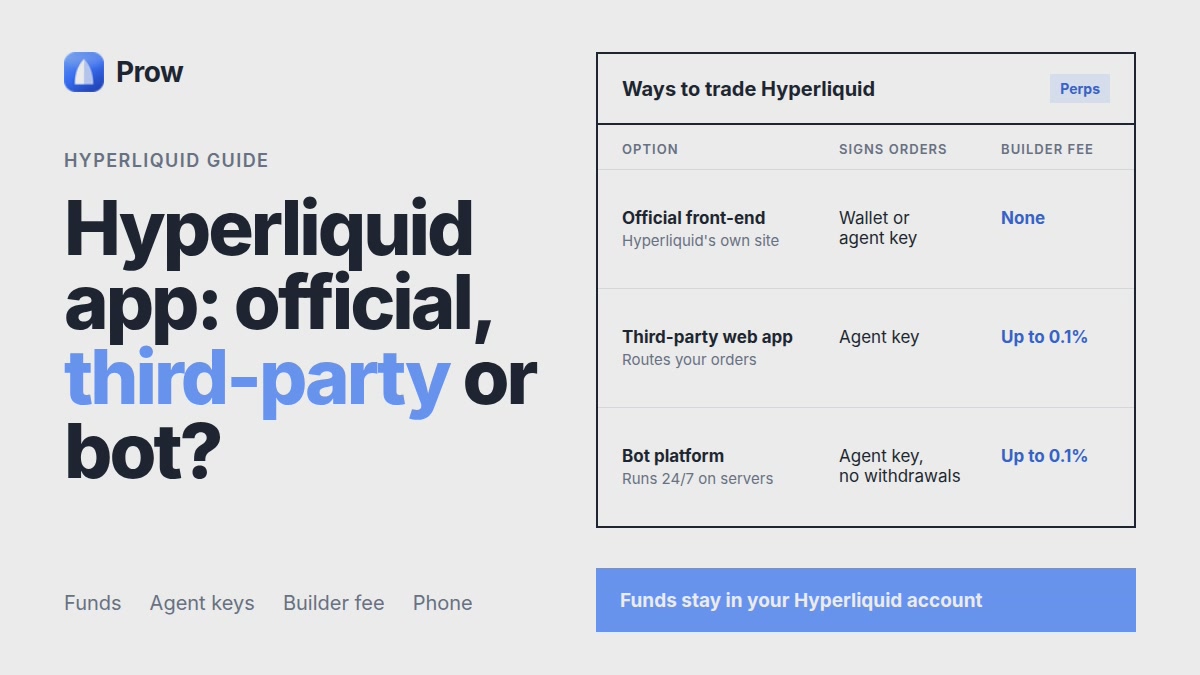
The term covers three access types. Each one routes orders to Hyperliquid itself. The app changes the interface, the access model and any extra fee. It does not change how the venue matches orders or liquidates positions.
- Official front-end: the interface run by the Hyperliquid team.
- Third-party web apps and terminals: built on the Hyperliquid API, often with extra views, alerts or other venues.
- Bot platforms: run strategies on their servers around the clock using a key you approve.
| Official front-end | Third-party web app | Bot platform | |
|---|---|---|---|
| Funds | Your Hyperliquid account | Your Hyperliquid account (if non-custodial) | Your Hyperliquid account (if non-custodial) |
| Key the app uses | Your wallet signs | Agent wallet, often stored on your device | Agent wallet on the platform's servers |
| Can the key withdraw? | Your wallet controls withdrawals | No, if it is an agent wallet | No, if it is an agent wallet |
| Builder fee | Venue fees | Possible, capped | Possible, capped |
| Other venues | Hyperliquid only | Depends on the app | Depends on the platform |
Where your funds sit with each type of app
With a non-custodial app, funds stay in your own Hyperliquid account. The app never takes a deposit. This holds for the official front-end and for any third-party app that only uses an agent wallet.
Hyperliquid's API docs describe agent wallets as "Stateless — No funds or positions held" (Chainstack). Dynamic's docs say the same: agent wallets "hold no funds but can execute Hyperliquid actions on behalf of a master account" (Dynamic).
Red flag: an app that asks you to send funds to its own address. That is a custodial service, not a front-end.
In Prow, funds stay in your Hyperliquid account and Prow does not hold them. Non-custodial does not mean risk-free. A position can still be liquidated, and the margin behind it can be lost in full.
Keys: what a third-party Hyperliquid app should and should never get
A third-party app should get an agent wallet. It should never get your seed phrase or main private key. Hyperliquid's exchange endpoints "require cryptographic signatures to ensure security and prevent unauthorized access" (Chainstack). An agent wallet is a separate key your main wallet authorises to sign those actions for you.
What the docs state:
- "Agent wallets can only sign trading operations, not withdrawals" (Dwellir).
- "The master wallet must sign approveAgent actions directly" (Dwellir).
- Agent wallets are "Revocable — Can be revoked by the master account" (Chainstack).
Then check where the key is stored, whether it expires and how to revoke it. In Prow, the key is created in the browser, confirmed with your wallet once, stored encrypted on your device and never sent to Prow's servers. It expires in 180 days and can be revoked at any time.
Hyperliquid grid bots and other bot platforms
Bot keys sit on the platform's servers so strategies can run 24/7. Check that the key cannot withdraw and what happens if the platform goes offline. Prow runs grid, DCA, funding, arbitrage, QFL and Ladder bots on Hyperliquid and Aster on its own servers, with a stop loss always on and a key that cannot withdraw. Our comparison of Hyperliquid trading bots covers hosted and self-hosted setups.
Fees inside an app: venue fees plus a possible builder fee
You pay Hyperliquid's maker/taker fees on every front-end. A third-party app may add a builder fee on top. Current venue tiers are on our builder fee and venue fees compared page.
Builder codes are "an on-chain, per-order attribution mechanism that lets apps and interfaces earn fees on orders they route for users" (Privy). How they work:
- "Users must approve a max builder fee for each builder they want to use" (Privy). Actual fees "can be lower, but never higher than this approved rate."
- "The user signs an approveBuilderFee action with their main wallet; agent (API) keys cannot approve builder fees" (HyperLink).
- "Spot buys do not accrue builder fees (same as Hyperliquid)" (HyperLink).
- A builder code does not change "execution, margin, liquidation, or funding" (HypeBasis, Nov 20, 2026).
Worked example: one $10,000 perp order
- Official front-end: venue fee only.
- App at the 0.1% perp cap: venue fee + $10.00 (HypeBasis, Nov 20, 2026).
- Prow: venue fee + $0 until Dec 31, 2026. After that, venue fee + $2.50 (0.025%). No subscription, deposit fee or spread markup.
The venue fee is the same in all three cases. In Prow, the fee is approved with a separate, optional wallet signature. More detail is in Hyperliquid builder fees: what apps can charge you.
Does Hyperliquid have a mobile app? Trading on a phone
You can trade Hyperliquid on a phone in three ways: a mobile browser, a web app added to your Home Screen, or a native app.
- Native apps: check that the store listing names the developer it claims to be.
- APK downloads: an "app download apk" link from an ad or a DM is a common way to spread fake wallets. Only install from a source named in official docs.
- Web apps: you install nothing. Check the exact domain instead.
On a phone, alerts matter more than charts. Check which venues and alert types an app supports before you rely on it.
Prow runs in the phone browser and can be added to the Home Screen. It sends liquidation and price alerts in the app and as push notifications, and push on iPhone needs iOS 16.4 or later. There is no App Store install.
Single-venue vs multi-venue apps
The official front-end covers Hyperliquid only. Multi-venue apps add other perp DEXs such as Aster and Lighter, which differ in fees, funding intervals and settlement asset. Our Hyperliquid vs Aster vs Lighter comparison sets these out with figures from each venue's docs.
What a multi-venue app adds:
- One list of positions and orders across accounts.
- A venue choice for each order: the best price for its size, or a venue you pick.
- Side-by-side data: funding per hour and APR, max leverage, volume and open interest.
What it does not change:
- Each venue keeps its own margin and liquidation rules.
- A hedge across two venues is two separate positions, and each can be liquidated on its own.
The Prow app for Hyperliquid, Aster and Lighter works this way. Its free funding, markets and fees tools update about every minute.
How to verify you are on a genuine app, not a phishing copy
A genuine app has an exact domain you reached from official sources. It only asks for signatures whose content you can read.
- Domain: open the app from the venue's or app's official docs or social accounts, not from ads or DMs. Bookmark it.
- Signatures: an agent or builder-fee approval should name its limits. Reject any request to transfer, withdraw or "verify" with a seed phrase.
- Bait: fake airdrop or points claims, cloned support chats and "wallet sync" messages.
- Cleanup: revoke agent keys and builder approvals you no longer use. To revoke a builder, "approve them with "0%"" (HyperLink). Each user can hold "at most 10 active builder-code approvals at a time" (HypeBasis, Nov 20, 2026).
Checklist before you connect any Hyperliquid app
Ask five questions before you sign anything:
- Where are my funds? They should stay in my Hyperliquid account.
- What key does the app get, and can it withdraw? It should be an agent wallet with no withdrawal rights.
- Is there a builder fee, and what is the approved maximum?
- Does it work on my phone, and which alerts does it send?
- Which venues does it cover?
For the connection steps in Prow, see Connect Hyperliquid in the Prow Docs.
Sources
- Hyperliquid: User-signed actions with Python SDK - Chainstack, Chainstack
- Hyperliquid agent wallets - Dynamic, Dynamic
- Hyperliquid: Authentication via signatures overview - Chainstack, Chainstack
- approveAgent payload (gRPC) | Hyperliquid API Docs | Dwellir, Dwellir
- Builder codes - Privy Docs, Privy
- Builder Codes | HyperLink Docs, HyperLink
- Hyperliquid Builder Codes: Fee Caps (0.1% Perps) & Checker | HypeBasis, HypeBasis, 2026-11-20
Frequently asked questions
Does Hyperliquid have an app?
Hyperliquid runs an official front-end, and third-party web apps, terminals and bot platforms are built on its API. Each of them sends orders to the same Hyperliquid order book. Matching, margin, liquidation and funding rules stay the same whichever interface you use.
Should I download a Hyperliquid mobile app or APK?
Some Hyperliquid apps work on a phone without an App Store install, so check how an app is delivered before you download anything. Phishing copies of Hyperliquid front-ends exist. Check the domain, read every wallet signature, and never enter your seed phrase or main private key.
What fees do I pay when I trade Hyperliquid perps through an app?
You pay Hyperliquid's maker/taker fees on every front-end, and a third-party app may add a builder fee on top. Your main wallet approves a maximum builder fee, and the documented cap on perps is 0.1%, or $10 on a $10,000 fill (HypeBasis, Nov 20, 2026). Spot buys do not accrue builder fees.
Can a Hyperliquid grid bot withdraw my funds?
A bot that uses an agent wallet can sign trades but cannot withdraw, and your main wallet can revoke that key. Bot keys sit on the platform's servers so strategies can run around the clock. Check that the key cannot withdraw and what happens to your open positions if the platform goes offline.
Is trading Hyperliquid perps through a third-party app riskier than the official front-end?
The venue's matching, margin and liquidation rules are the same in every app, and a builder code does not change execution, margin, liquidation or funding. What differs is where the key is stored, whether a builder fee is added and whether the app is non-custodial. No app lowers liquidation risk, and a leveraged position can lose its whole margin.