Perp DEX aggregator: one ticket, three venues
Trading on Hyperliquid already? The ticket also reads the Aster and Lighter order books, works out your size's average price on each and opens on the one with the best price, before fees. You can pick any venue, and the order goes from your own account there. Funds stay on the venue and the trading key can't withdraw.
 Hyperliquid
 Aster
 Lighter
- The key can't withdraw
Opens the live BTC screen in the app. No sign-in to look around; you sign in when you place an order.
How the ticket picks a venueExample: BTC Long, $1,000
Average buy price
LongHyperliquid$64,263
LongAster$64,279
LongLighter$64,268
Your ticket
VenueHyperliquidBest price
OrderLong $1,000BTC
Leverage5xIsolated
The ticket opens on the lowest average buy
$64,263 on Hyperliquid
Example prices, fees not in them. A Short goes to the highest average sell
- Venues
- Three perp DEXs
- Routing
- Best price by default
- Orders
- Market, limit, stop
- Protect with
- Take profit, stop loss
- The key
- Can't withdraw
- Prow's fee
- 0% until Dec 31, 2026
How does Best price pick the venue?
It is a rule you can check, and it does not always find the cheapest trade. It is the default of the ticket's venue row, and you can pick any venue on any order.
- Prow walks each venue's live order book for your order's size ($1,000 until you type an amount) and works out the average price you would get right now.
- A Long goes to the venue with the lowest average buy price, a Short to the one with the highest average sell price.
- Thin venues are skipped while a liquid one is left: under $50,000 of 24 hour volume or 2% of the busiest venue's, or a spread wider than 0.5% of the price, or a book too shallow for your size.
- The badge moves only when another venue is better by 0.015%, so it does not flip between near-equal quotes.
- Only the venues you have connected are compared. With none connected, every venue that lists the coin is.
What it leaves out
- Fees are not in the average price. The venue list shows each venue's fee beside its price.
- An order goes to one venue and is never split across venues. Positions on two venues are two positions.
- Where you already hold the coin, the ticket opens on that venue so new orders add to the position or reduce it. A venue you pick, or a link asks for, comes first.
- It is a default: Settings, Venue routing offers Best price, Lowest fee (the lowest base taker rate, Prow's fee not counted) or Fixed venue (Hyperliquid when it lists the coin), and you can pick a venue on any order.
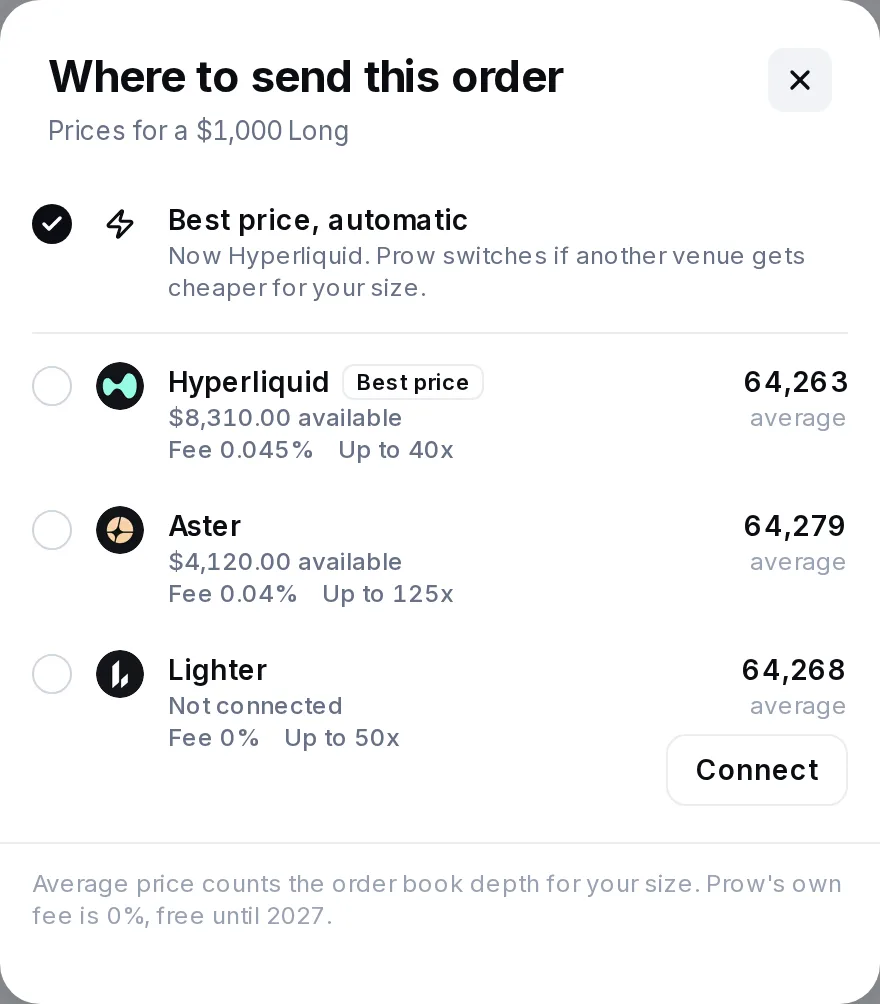
Example: the same $1,000 BTC Long on three venues
| Venue | Average buy price | Above the lowest price | Venue fee | Prow's fee from Jan 1, 2027 | In all above the lowest price |
|---|---|---|---|---|---|
| Hyperliquid, Best price | $64,263 | $0.00 | $0.45 | $0.25 | $0.70 |
| Aster | $64,279 | $0.25 | $0.40 | $0.25 | $0.90 |
| Lighter | $64,268 | $0.08 | $0.00 | $0.00 | $0.08 |
Best price picks Hyperliquid: the lowest average buy price. Counting the venues' fees and Prow's from Jan 1, 2027, Lighter would have cost $0.62 less on this order, because Best price compares prices and leaves fees out. The venue list shows both, and Settings has a Lowest fee routing, which looks at the venues' taker rates.
A $1,000 BTC Long with made-up prices, the same as in the picture and on the cover. Venue fees are base-tier taker rates. Prow's fee is 0% until Dec 31, 2026; its column shows 0.025% from Jan 1, 2027.
Why not just use each venue's own site?
On one venue you may not need Prow. It earns its place when you use two or more, or want to know whether another would fill your size better. What stays with the venue: your money, your account and its rules.
| Question | On the venue's own site | In Prow |
|---|---|---|
| The price of a coin | One venue's book | Each connected venue's average price for your size, Best price marked |
| Accounts | One login and wallet per venue | Each venue connected once, positions on every venue in one portfolio |
| Fees | The venue's | The venue's, plus Prow's on Hyperliquid and Aster |
| Deposit and withdraw | On the venue | Hyperliquid in Prow, signed by your wallet. The docs say where Aster and Lighter happen |
| Where you can use it | The venue's own rules | The same rules, plus Prow's own. Prow does not route around either |
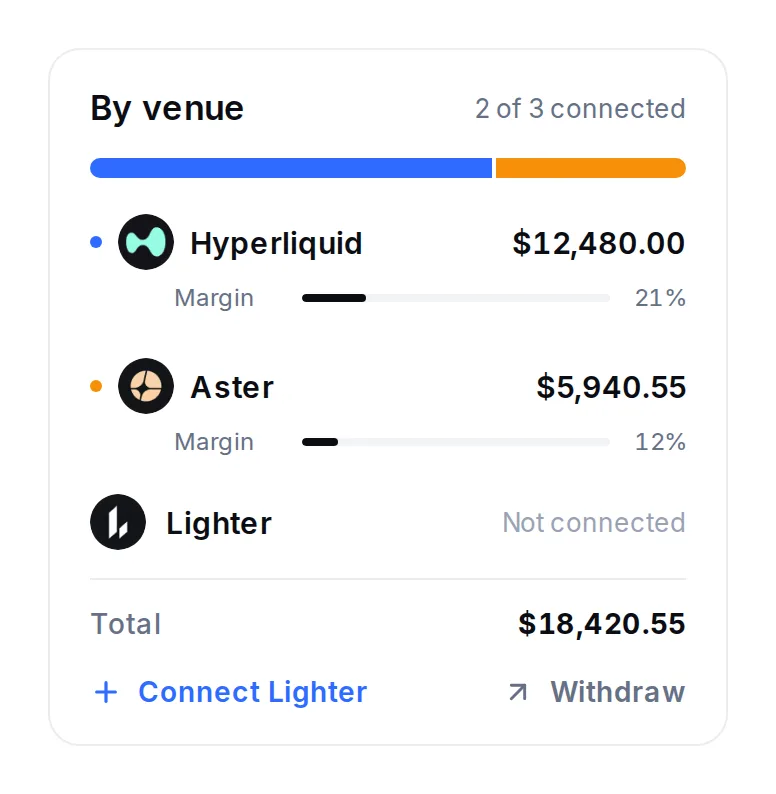
Is my money safe?
Prow holds none of it. The trading key is the only thing Prow uses to place orders, and it is limited to trading.
Who holds your money
The venue. Your margin sits in your own account on Hyperliquid, Aster or Lighter, and only your wallet can withdraw from it. Deposits go from your wallet to your account.
What the key can and cannot do
It can place, edit and cancel orders, set take profit and stop loss, and change leverage and margin mode. It cannot withdraw, send funds to another address or approve another key. On Hyperliquid, Prow's code also keeps a list of allowed calls and refuses anything not on it before it is signed. On Aster the key moves money only between your own spot and futures.
Where the key lives
It is made in your browser and encrypted there, and Prow's servers never receive it. The one exception is a backup you turn on yourself, encrypted so that Prow cannot open it. It works for up to 180 days and you renew it with one signature. Someone who got it could place bad trades, and still could not take your funds out.
What else is on the screen?
A full trading screen, not only a price picker, for the same coin on every venue you connect.
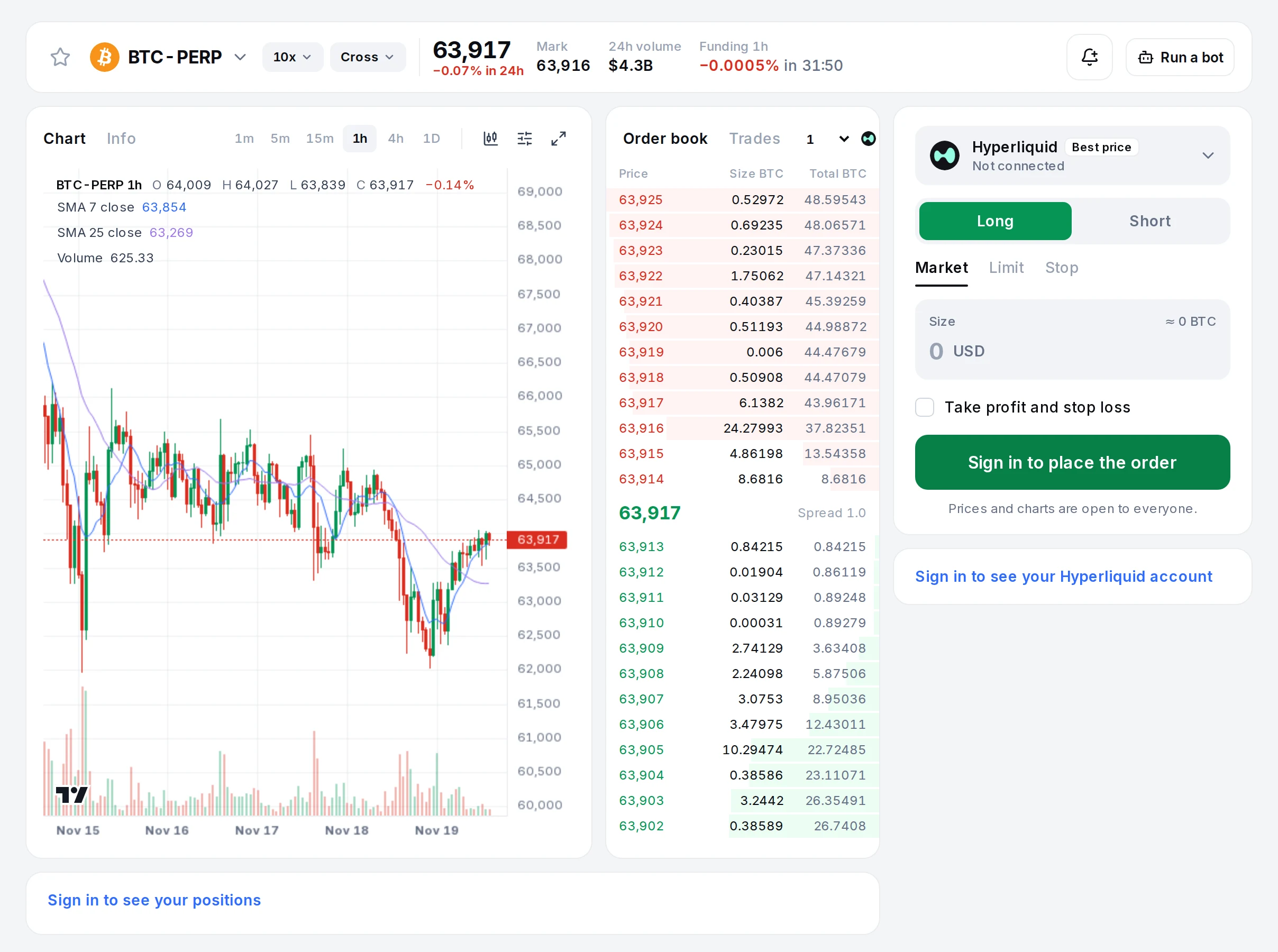
A chart you can trade from
Candles with volume from 5 minutes to 1 week, the order book, the trades tape and drawing tools on perps. Each coin has a page whose Info tab compares its venues.
The order types you expect
Market with a max slippage, limit, stop market and stop limit (triggered on the mark price), post-only and reduce-only. Spot on Hyperliquid and Aster is on the same screen, without leverage.
Take profit and stop loss
On a new order or on an open position, per order or for the whole position. A take profit ladder places several at once, and Aster adds a trailing stop.
The numbers before you confirm
Leverage and margin mode (cross or isolated) are two chips by the market name. Above the button: margin, estimated liquidation price and fees. A market order's review shows its worst price.
Every venue in one portfolio
Positions on all venues in one list, closest to liquidation first, each with Close. Liquidation warnings are always on, price alerts are yours to set, and push works from an installed app.
What does it cost?
Each venue's own fee, plus Prow's on Hyperliquid and Aster: 0% until Dec 31, 2026, then 0.025% per trade. Lighter's Standard account has no fee, and Prow adds none there. There is no subscription.
| Venue | Taker | Maker | Prow's fee |
|---|---|---|---|
| Hyperliquid | 0.045% | 0.015% | 0% until Dec 31, 2026, then 0.025% per trade |
| Aster | 0.04% | 0% | 0% until Dec 31, 2026, then 0.025% per trade |
| Lighter | 0% | 0% | None |
Base-tier perp rates, checked 2026-11-20; your own tier can be lower. Both fees show in the ticket under Fees before you confirm. Prow charges nothing on deposits, withdrawals or transfers. Hyperliquid's withdrawal fee is 1 USDC, taken from the amount.
How do I start?
You need a wallet of your own or the Prow wallet that Prow makes at sign-in, and USDC on a venue to trade with. Prow has no card or bank purchase.
- 01
Look at the live screen
Press Open the BTC trade screen. The chart and the ticket open in the app with no sign-in, to look at and nothing more.
- 02
Sign in and connect a venue
Prow asks you to sign in when you place an order, with Google, email, a wallet or a passkey and the Terms box ticked, and returns you to the same screen. A new account that came for this screen skips the setup steps; other destinations pass up to two, each with Skip. On Hyperliquid your wallet signs one free message that approves the trading key, and an optional second that approves Prow's fee. On Aster it switches to BNB Chain and signs one message, two if the wallet already has an Aster account. On Lighter it signs one message. No funds move.
- 03
Deposit from your own wallet
Deposit sends USDC on Arbitrum from your wallet to your own Hyperliquid account: one message and one transaction, a minimum of 5 USDC, about a minute, with a little ETH for the network fee. Already funded on a venue? Skip this. The docs say how Aster and Lighter accounts are funded.
- 04
Place the order
Pick a coin, check the venue row, choose Long or Short and the order type, type the size and add Take profit and stop loss if you want. Check Margin, Liq. price and Fees, then Review order and confirm. No wallet pop-up: the trading key signs.
Nothing is placed until you press Confirm.
What are the limits and risks?
Leverage can wipe out your margin
A small move can reach your liquidation price, where the venue closes the position and you lose the margin. Lower leverage puts it further away. The ticket shows the estimate before you confirm.
Best price is a snapshot
It is the book at the moment you look. A market order can fill at a worse price while it fills; Max slippage caps how far, and an order the book cannot fill within the cap does not fill.
The venues are not the same
Hyperliquid has its own trailing stop, which Prow does not offer there yet, and attaches take profit and stop loss to the order. Aster places them after the fill and allows 10 trigger orders per market. Lighter spot pairs are view only in Prow.
A key in a browser is a key
Anyone who uses your browser while you are signed in can trade with its keys. Use a device only you use, and on a shared one remove the keys when you sign out.
What Prow does not do
- It does not hold your money, and it has no card or bank purchase: money comes from a wallet you own.
- It does not change a venue's rules, fees or availability, and does not route around them.
- It does not give advice or a forecast. It shows prices, fees and risk.
Questions about Trade
Why not just use Hyperliquid's own site?
If you only trade Hyperliquid, you may not need Prow. It pays off when you also use Aster or Lighter, or want to know whether they would fill your size better: the ticket shows each venue's average price and fee for your size, and one portfolio lists the positions on all of them. Hyperliquid stays your account and your venue either way.
Read more: Hyperliquid vs Aster vs Lighter
What does a perp DEX aggregator actually aggregate?
Prices and accounts, not liquidity. Prow reads the order books of Hyperliquid, Aster and Lighter, shows each venue's average price for your size and sends the order to one of them. Each venue keeps its own book, its own account and its own positions.
Read more: Choose a venue and Best price, in the docs
Can Prow withdraw my funds?
No. The trading key can place, edit and cancel orders and change leverage and margin mode. It cannot withdraw, send funds to another address or approve another key. Withdrawals need a signature from the wallet that owns the account, and Prow holds no funds of its own.
Read more: Why a trading key can't withdraw, How trading keys work
What does it cost on top of the venue's fee?
Prow's fee is 0% until Dec 31, 2026, then 0.025% per trade on Hyperliquid and Aster, nothing on a Standard Lighter account, and nothing on deposits, withdrawals or transfers. The ticket shows the venue's fee and Prow's under Fees before you confirm.
Read more: Perp DEX fees compared, Hyperliquid builder fees
Do I need to move my money or open accounts on all three venues?
No. Your money stays on the venue where it is, and you connect one venue or all three. Connecting an existing Hyperliquid account takes one free signature that approves the trading key. Best price compares the venues you have connected, and a coin on a venue you have not connected shows Not connected there, with a Connect button that keeps your order filled in.
Read more: What you sign, in the docs
Will it work where I live?
Prow and each venue have their own rules about where they can be used, and the sign-in page says where Prow is not available. Prow does not route around a venue's rules, so where a venue is closed to you, it stays closed.
How many signatures does the first trade take?
On Hyperliquid, one free signature approves the trading key and an optional second approves Prow's fee. A deposit is one message and one transaction, and the minimum is 5 USDC. After that, orders need no wallet pop-up: the key signs them. Aster and Lighter each ask for one signature to connect.
Read more: Your first trade, in the docs