Skip to content

DCA bot for Hyperliquid and Aster

Prow's DCA bot is for coins that dip and bounce: it buys more as the price falls and sells it all at one take profit above the average. A stop loss is always on.

  • Hyperliquid
  • Aster
  • Stop loss always on
  • The key can't withdraw

Bots are switched on account by account. Any Prow account can open the builder.

Runs on
Hyperliquid and Aster
Direction
Long or Short
Extra buys
0 to 25
Stop loss
Always on
The key
Can't withdraw
Prow's fee on perps
0.01% to 0.025% a fill

What does the bot do once it starts?

A deal opens with a base order. If the price falls, the bot adds extra buys under it (other platforms call them safety orders), and each one lowers the average price of what it holds. One take profit above the average sells the whole position. It runs on Prow's servers around the clock, so nothing has to stay open on your device, and it never moves money.

  1. 01

    It opens a deal

    The base order goes in at market, or as a limit order if you chose that. The bot then rests the first extra buys under it as limit orders, as many as Max active extra buys says (2 by default), and a take profit and a stop loss for what it holds. Resting orders pay the maker fee. The chart labels the base order First buy and the extra buys Buy 1, Buy 2 and so on.

  2. 02

    Every fill moves the average

    When an extra buy fills, the bot works out the new average, moves the take profit to its set percentage above it and the stop loss to its set percentage under it, and rests the next extra buy. The chart draws the average as a line labelled Avg, and the Position tab shows the take profit and the stop loss prices.

  3. 03

    A stop loss is always on

    On futures a stop order rests on Hyperliquid or Aster, under the average, and closes the position if the price reaches it. Because the order is on the venue, it can still fire if Prow's servers are down. On spot, Prow's servers watch the price instead: at the stop they cancel the take profit sell and sell the coins at market. The stop cannot be taken off. A Max loss, 30% of the investment unless you set it, closes the bot at market if its total loss reaches that first.

  4. 04

    It closes the deal and starts the next

    When the price reaches the take profit, the whole position is sold and the deal goes into the Trades tab. With Repeat on, the next deal starts, after the cooldown if you set one. If the price reaches the stop loss first, the deal closes at a loss and the bot stops, or starts the next deal if you picked Close and start next.

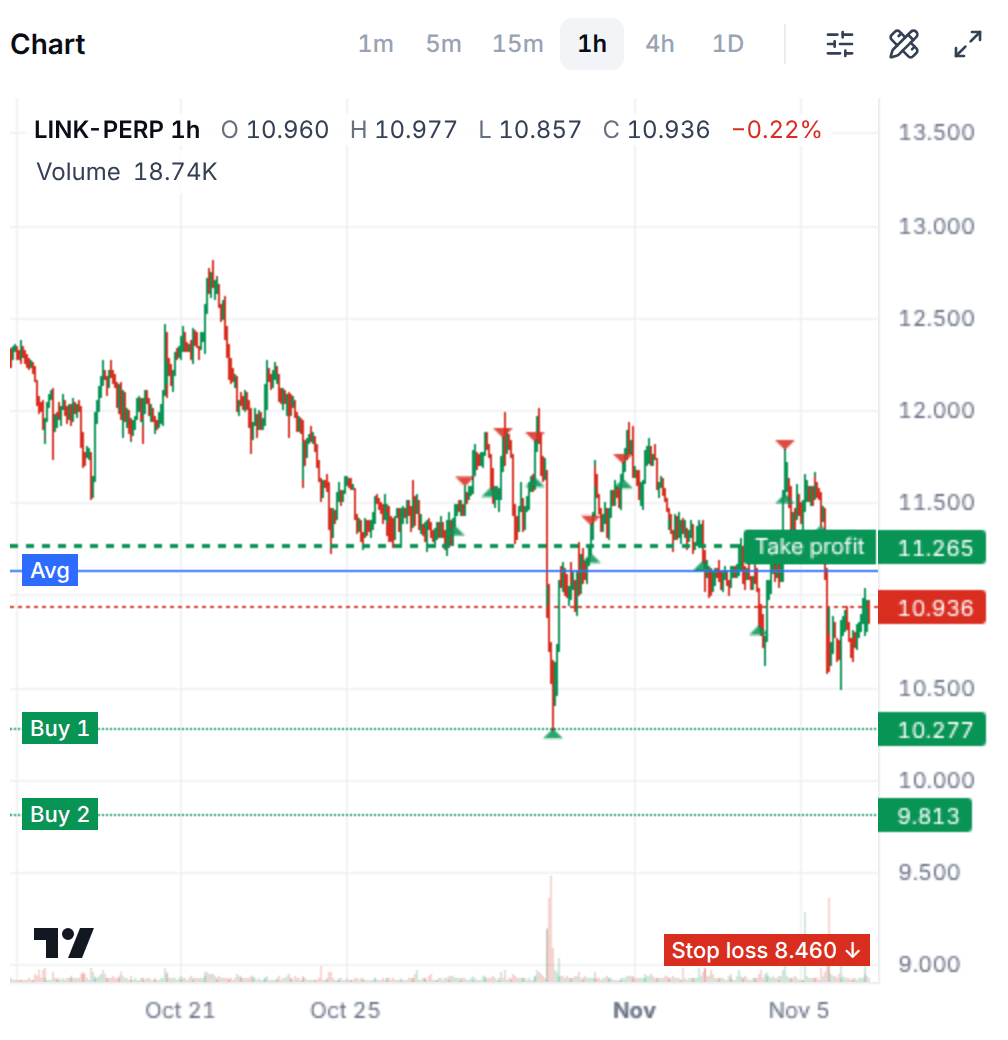
The chart of a running Long DCA bot on LINK-PERP over 30 days: candles with a green triangle for each buy and a red one for each sell, the average price as a blue line, the take profit as a dashed green line above it, two extra buys waiting below the price and a stop loss at the bottom.
A running DCA bot's chart on Nov 6, 2026: its fills, the average, the take profit, the extra buys still waiting and the stop loss. The figures are a sample bot's.
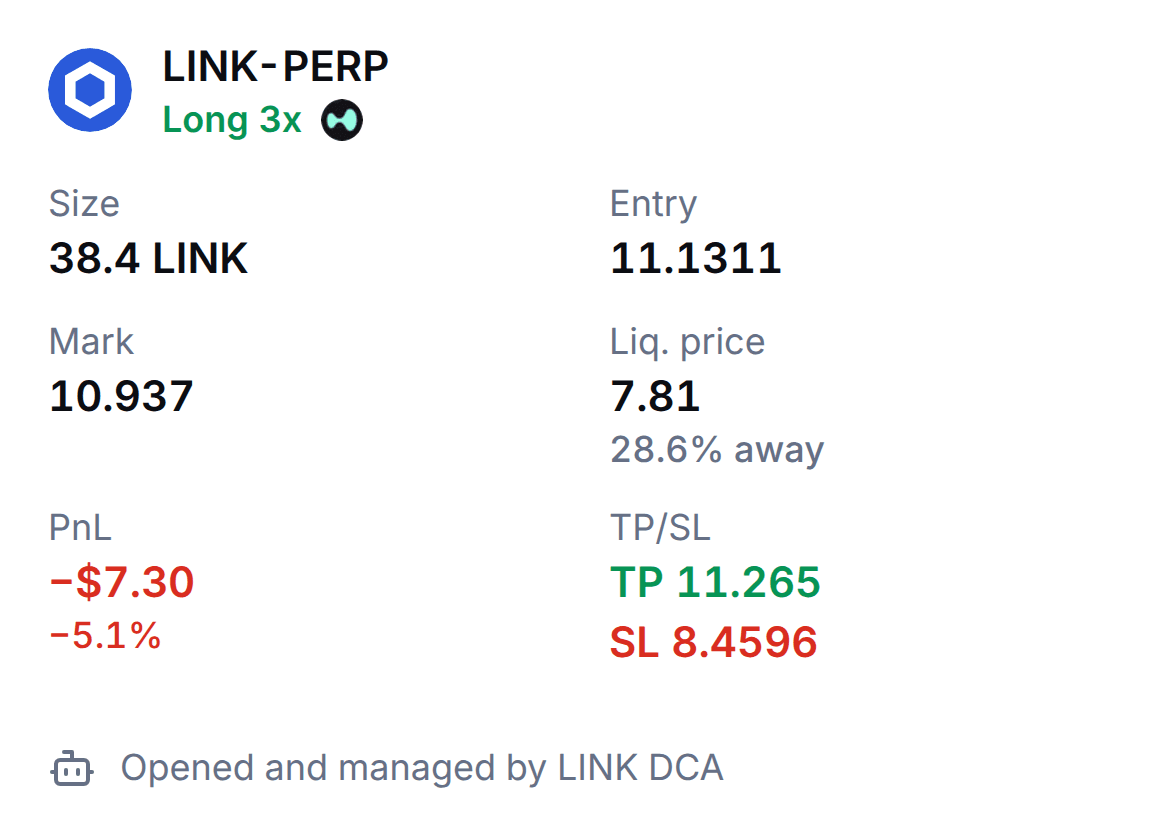
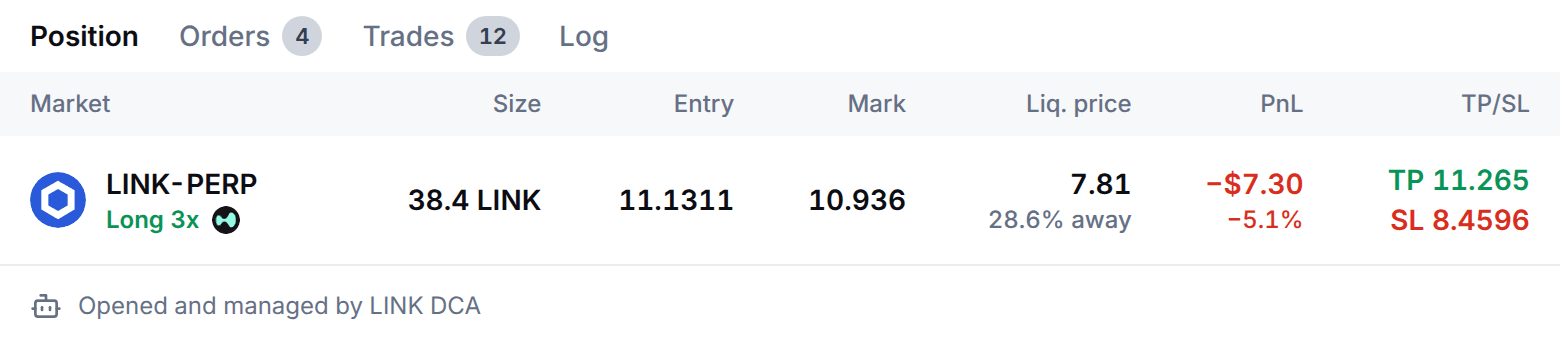
The Position tab of a running Long DCA bot on LINK-PERP at 3x: the size, the entry, the mark price, the liquidation price with how far away it is, the profit and loss, and the take profit and stop loss prices.
The same bot's Position tab on Nov 6, 2026: its entry, the take profit and the stop loss, and the liquidation price beyond the stop. The figures are a sample bot's.
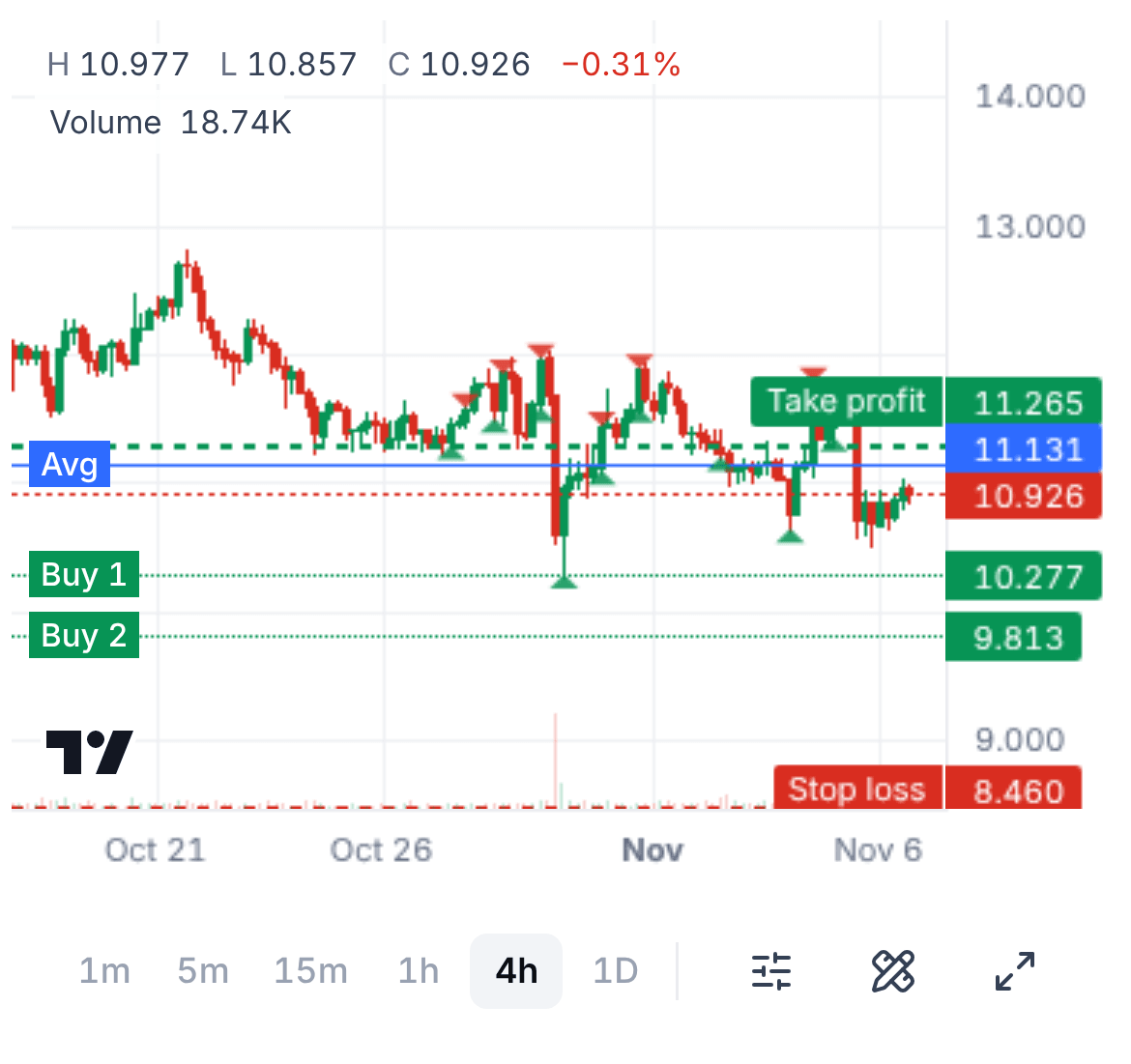
On a phone, the chart of a running Long DCA bot on LINK-PERP: candles with a green triangle for each buy and a red one for each sell, the average price as a blue line, the take profit above it, two extra buys waiting below the price and a stop loss at the bottom.
On a phone, a running DCA bot's chart on Nov 6, 2026: its fills, the average, the take profit, the extra buys still waiting and the stop loss. The figures are a sample bot's.

What do the numbers look like?

Both cases use one deal: a Long DCA bot at 1x on a coin at $100, a $100 base order and 5 extra buys of $100, so $600 at most, with the builder's other defaults: the first extra buy 2% under the base order, a step scale of 1.2, a volume scale of 1.0, a take profit of 1.5% above the average and a stop loss 18% under it.

  • $8.49

    A deal that closes at the take profit

    All 6 orders filled at an average of $93.17. The take profit, 1.5% above it at $94.56, makes $9.00 before fees. Hyperliquid's fees (0.015% resting, 0.045% at market) and Prow's (0.025%) take $0.51. Your own fee tier may be lower.

  • −$108.61

    A deal that closes at the stop

    The stop, 18% under the average at $76.40, closes the same $600: $108.00 on the coins plus $0.61 in fees, before slippage.

  • About 13

    Take profits to earn one stop back

    At $8.49 each. A DCA bot wins a little, often, and loses a lot when it loses, which is why its stop loss is always on.

The price falls, then bounces

Each extra buy that fills lowers the average, so the take profit comes closer to where the price is.

Size
$600 at most in a Long DCA bot at 1x: a $100 base order and 5 extra buys of $100
Extra buys
5 at 2.00%, 4.40%, 7.28%, 10.74% and 14.88% under the base order
The price falls to
$85.12, the last extra buy, so all 6 orders fill
The average
$93.17 on $600: 6.44 coins
The take profit
$94.56, 1.5% above the average and 5.44% under the base order's $100.00
It makes
$9.00 before fees, $8.49 after $0.51 of fees
What the price does
Falls 14.88%, then bounces 11.10% from the bottom
The price falls, then bounces: What a bounce needs, by how far the price fell first
If the price turns atTake profit atBounce needed
$100.00, the base order$101.50+1.50%
$98.00$100.47+2.53%
$95.60$99.30+3.87%
$92.72$97.95+5.64%
$89.26$96.39+7.98%
$85.12, the last buy$94.56+11.10%
Small and steady while it lasts. The take profit takes 1.5% of whatever is in the deal: $1.50 on the base order alone, $9.00 on all 6 orders, before fees. The $108.61 that the stop costs in the other case takes about 13 take profits of $8.49 to earn back.
The price keeps falling

Every extra buy fills on the way down, so the bot holds the most coins at the lowest prices, and the stop closes them.

Size
$600 at most in a Long DCA bot at 1x: a $100 base order and 5 extra buys of $100
Extra buys
5 at 2.00%, 4.40%, 7.28%, 10.74% and 14.88% under the base order
On the way down
Buys $100 at each of $98.00, $95.60, $92.72, $89.26 and $85.12
The stop loss
$76.40, 18% under the average of $93.17
At the stop
Sells 6.44 coins that cost $600 for $492.00
Fees
$0.61: the base order, the 5 extra buys and the stop
What the price does
Falls 23.60% under the base order and does not come back
The price keeps falling: What the bot holds, and what closing it would make, as the price falls
If the price isThe bot holdsClosed here
$98.002.02 coins at $98.99−$2.00
$95.603.07 coins at $97.83−$6.85
$92.724.14 coins at $96.50−$15.68
$89.265.27 coins at $94.96−$30.01
$85.126.44 coins at $93.17−$51.84
$76.40, the stop6.44 coins at $93.17−$108.00
The stop closes 6.44 coins bought at $93.17 on average at $76.40: $108.00 lost on the coins and $0.61 in fees, $108.61 in all, 18.1% of the $600. At $8.49 a take profit, that is about 13 take profits to earn it back. The prices are before slippage.

Prices are before slippage. The base order is a market order and the stop is a taker order; the extra buys and the take profit rest on the book. On Aster's USDT perps the base-tier maker fee is 0% and Prow's fee is 0.01%, so the same deal costs less there. Your own fee tier may be lower than the base tier.

Martingale: what a volume scale above 1 does

With a volume scale of 1, every extra buy is the size of the base order. Above 1, each extra buy is that many times the one before: that is a martingale, the bet that sizing up on a falling price makes the deal close sooner.

It does close sooner. The average moves toward the price faster, so a smaller bounce reaches the take profit. It also puts more money in at lower prices, so the loss at the stop grows in the same proportion. At 1.5 in the example the 6 orders cost $1,419 instead of $600, the bounce needed from the last buy falls from 11.10% to 7.45%, and the stop loses $255.38 instead of $108.00.

The form warns above 1.2: "Each extra buy is bigger than the last (martingale). Losses grow fast if the price keeps going." In Prow's research on past prices, martingale DCA without a stop wiped out accounts in most runs, and with a stop it did no better than chance. Keep the volume scale at or near 1 unless you have worked out the worst case.

The same deal at two volume scales

The deal of the example with a volume scale of 1.0 and of 1.5: the size of each order, what is in the deal, the average, the take profit, the bounce needed, the stop loss and what it loses
What it isScale 1.0Scale 1.5
Size of each order$100 each$100 to $506
In the deal, all 6 filled$600$1,419
Average price$93.17$90.11
Take profit at$94.56$91.46
Bounce needed+11.10%+7.45%
Stop loss, 18% under$76.40$73.89
Loss at the stop−$108.00−$255.38
The page's deal with the same prices and the same stop, which is measured from the average. The bounce is the rise from the last extra buy to the take profit. A bigger volume scale puts more money in at lower prices, so the average comes down faster, the take profit is closer and the stop loses more. Prices and losses are before slippage and fees.

When does a deal start, and what is QFL?

A deal starts at once by default. Under Advanced it can start when the price reaches a level you set, or when you press Start deal. QFL, which has its own entry in Start a bot, starts a Long deal when the price cracks under a recent low it already bounced from, and then works the bounce with the same extra buys, take profit and stop loss.

Spot DCA or futures DCA?

The market picker of the builder sets it, as on Trade: Futures or Spot. A spot DCA bot has no leverage and cannot be liquidated, but it can still end up holding a coin that has fallen a long way.

Spot DCA

Where
Hyperliquid spot, on Prow's list of spot markets
Direction
Long only
Leverage
None, so no liquidation
Your funds
USDC in your spot balance; the bot cannot move funds
Funding
None
The stop loss
Prow's servers watch the price: at the stop they cancel the take profit sell and sell the coins at market
When you stop it
Sell the deal's coins, keep them, or wait for the take profit

Futures DCA

Where
Hyperliquid and Aster perps
Direction
Long (the default) or Short
Leverage
1x to 3x, and 4x or 5x on the deepest markets, isolated
Your funds
Free margin on the account
Funding
Paid or collected while a deal is open
The stop loss
A reduce-only stop order rests on the venue and closes the position, even if Prow's servers are down
When you stop it
Close the position, keep it with its stop, or wait for the take profit

Long or Short?

A futures DCA bot has a direction. It decides which way the bot buys more and which way a trend hurts it. The builder's chart draws the first order, the extra orders, the take profit and the stop loss for the direction you pick.

  • Long

    The default

    Opens with a buy and buys more as the price falls, then sells everything above the average. It earns on a dip that bounces and loses when the price keeps falling. The stop sits under the average, and the chart calls the orders First buy and Buy 1, Buy 2 and so on.

  • Short

    Futures only

    The mirror: it opens with a sell and sells more as the price rises, then buys everything back under the average. It earns on a rise that falls back and loses when the price keeps rising. The stop sits above the average, and the chart calls the orders First sell and Sell 1, Sell 2 and so on.

The review warns about a Short before you sign: "Short DCA loses when the price keeps rising." QFL is Long only.

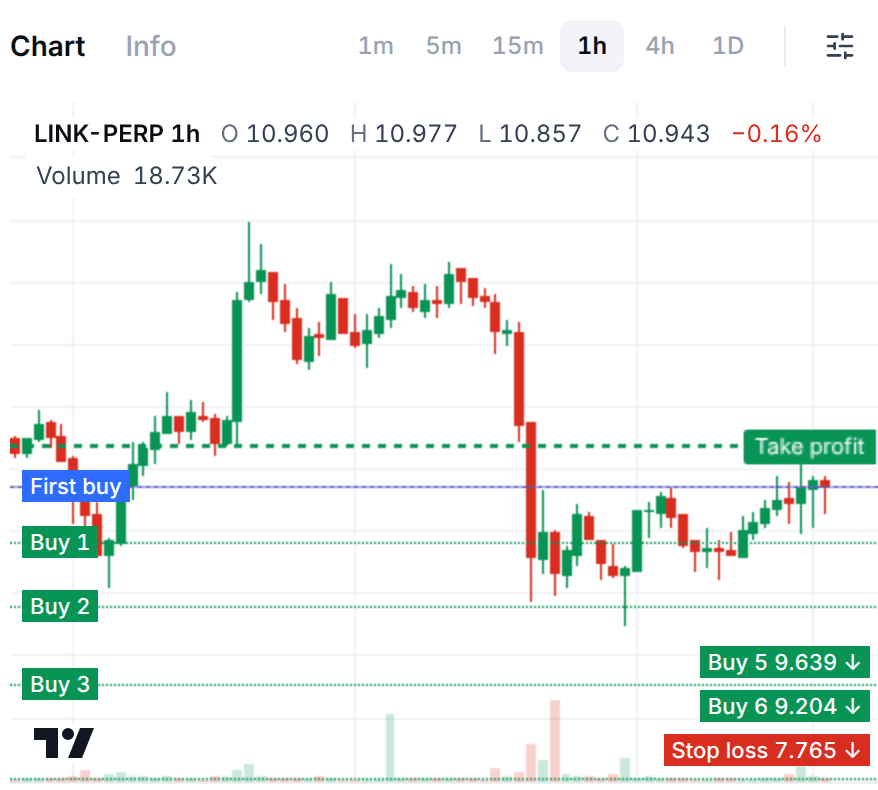
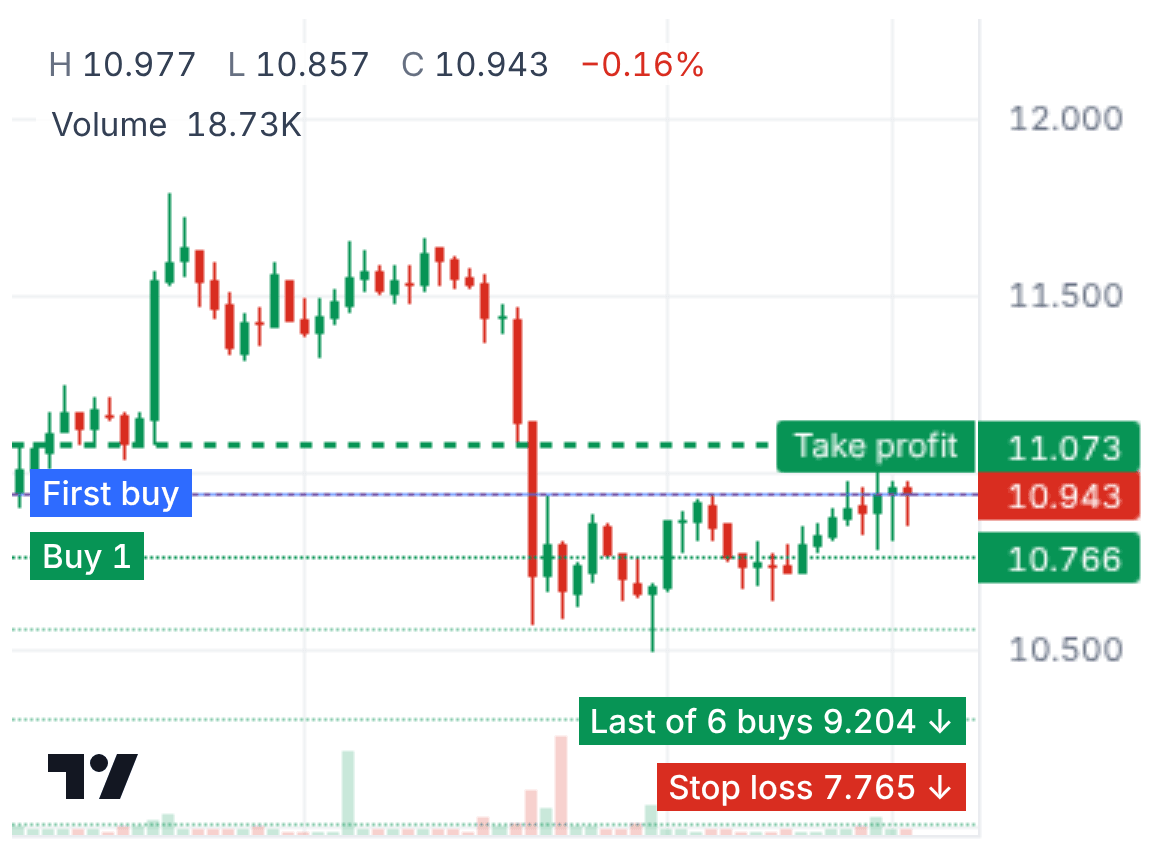
The builder's chart with a Long DCA bot on LINK-PERP: candles, the first buy and the extra buys under it, labelled Buy 1, Buy 2 and so on, the take profit above and the stop loss at the bottom.
A Long DCA bot in the builder on Nov 6, 2026: the extra buys under the first buy, the take profit above. The figures are a sample account's.
On a phone, the builder's chart with a Long DCA bot on LINK-PERP: the first buy and the extra buys under it, the take profit above and the stop loss at the bottom.
On a phone, a Long DCA bot in the builder on Nov 6, 2026: the extra buys under the first buy, the take profit above. The figures are a sample account's.

Which settings does a DCA bot have?

A run length (1 to 3 days, 3 to 15 days or 25+ days) fills most of them in from the coin's recent prices. Four shape the ladder, below; everything else sits under Manual adjustment, and the docs explain every field.

  • Extra buys

    Default: 5

    How many orders average the deal down, 0 to 25, each the size of the base order unless you change it. Max active extra buys (2 by default) is how many rest at once.

  • Price deviation

    Default: 2%

    How far under the base order the first extra buy sits, 0.5% to 10%. Each gap after it grows by the step scale: 1.2 by default, so the gaps run from 2% to 4.15% in the example.

  • Take profit

    Default: 1.5%

    Where the deal closes, as a share above the average (or the base order), 0.2% to 50%. Optional: a trailing take profit that follows the price, or a take profit in 2 or 3 steps.

  • Stop loss

    Default: 18%

    Required, and measured from the average, so it moves with it. It starts at how far the extra buys reach plus 3%, rounded up, and the form shows the smallest it allows.

How do I start a DCA bot in Prow?

You need a Hyperliquid or Aster account linked in Prow with free margin for the bot, or USDC in your Hyperliquid spot balance for a spot DCA bot. The bot cannot move funds, so deposit first. Bots run only on the markets on Prow's list, the ones with a deep order book, and one bot can run on a market on an account at a time.

  1. 01

    Open Bots, press Start a bot and pick DCA

    The list shows ready settings for liquid coins: tap one and the builder opens with it filled in. Or press Set up myself and pick the market there. QFL has its own entry in the same list.

  2. 02

    Pick the market and the direction

    The market is picked in the header, as on Trade: a coin on Hyperliquid or Aster, Futures on both and Spot on Hyperliquid. Direction is Long or Short on futures.

  3. 03

    Enter the investment and the leverage

    Investment is what the bot may use. 25%, 50% and Max fill in a share of what is available, and the base order and the extra buys follow it. Leverage starts at 1x.

  4. 04

    Pick a run length, or open Manual adjustment

    1 to 3 days, 3 to 15 days or 25+ days fill in the ladder, the take profit and the stop loss fitted to the coin's recent prices. Under Manual adjustment are the Base order, the Extra buys, the Price deviation, the two scales, the Take profit and the Stop loss, with an Extra buys preview of every order, and under Advanced the trailing options, the deal start, the cooldown, the max loss and Repeat.

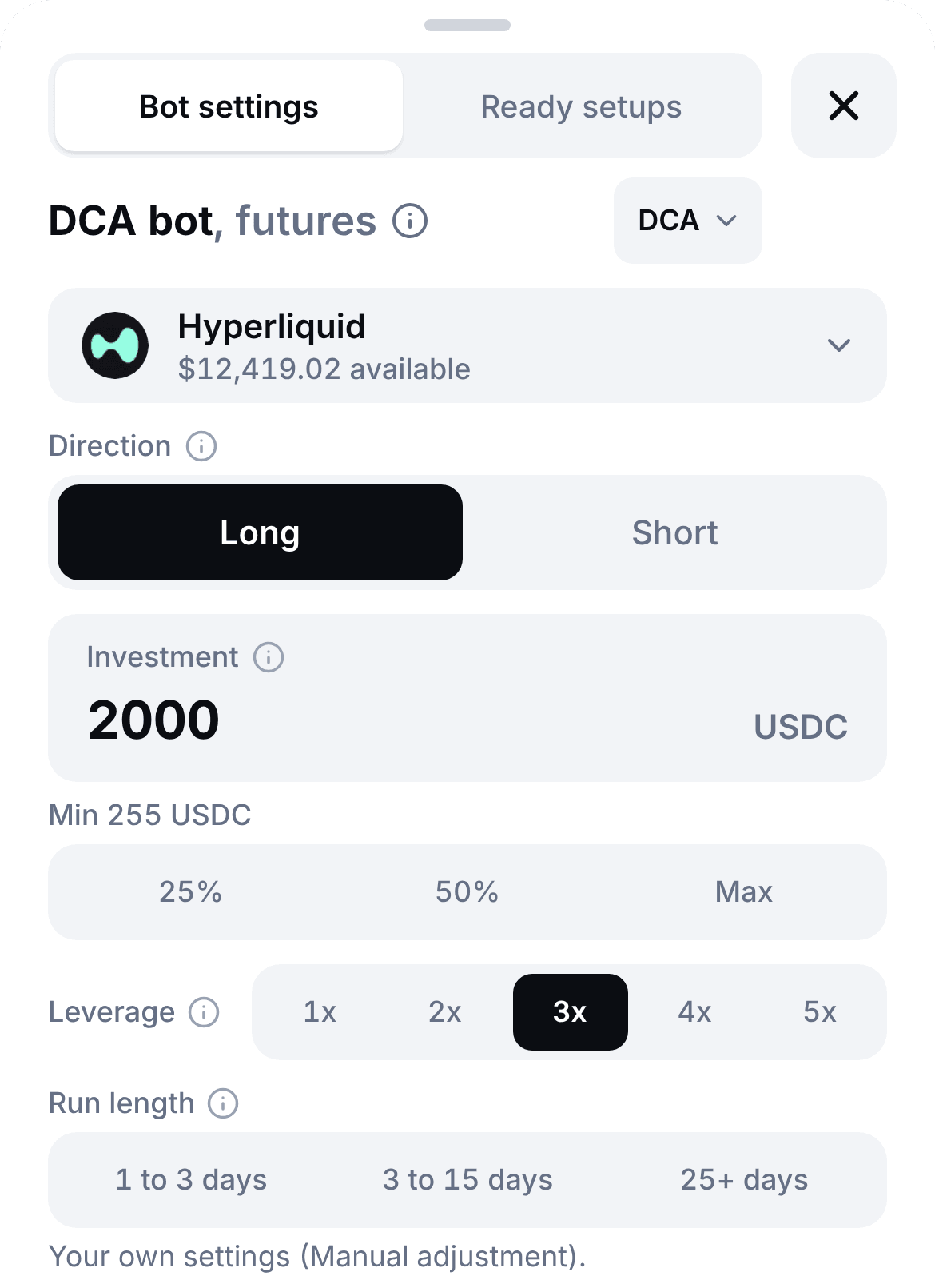
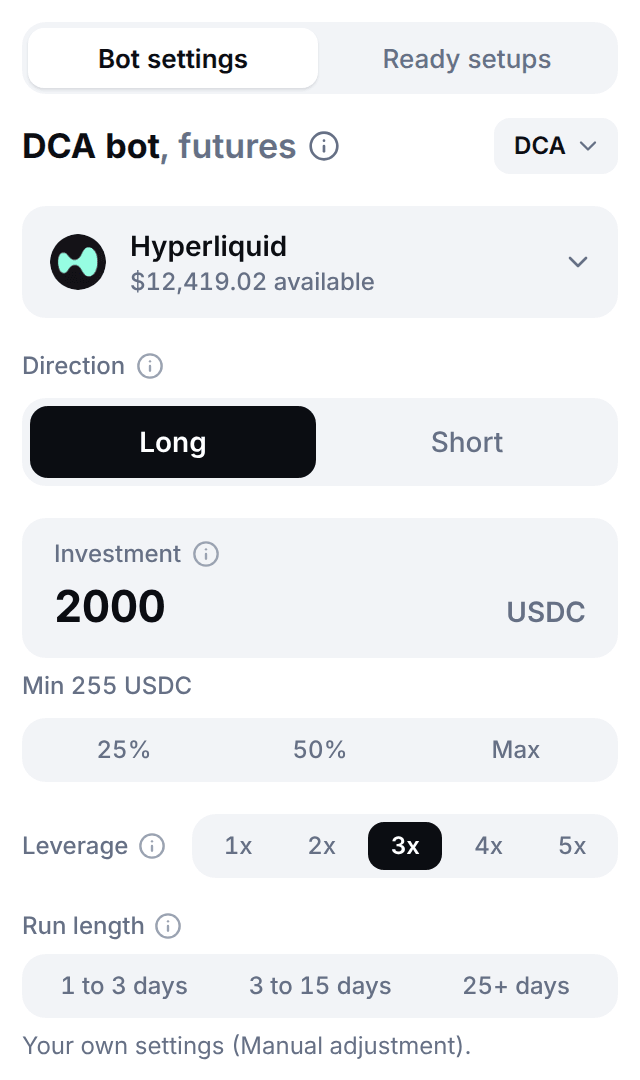
  5. On a phone, the DCA builder as a sheet: the Hyperliquid account, the Direction switch, the investment, the leverage, the run lengths and a line saying the settings can be set by hand under Manual adjustment.
    On a phone, the DCA builder on Nov 6, 2026: the direction, the investment, the leverage and the run length. The figures are a sample account's.
  6. 05

    Press Continue, read the review and sign

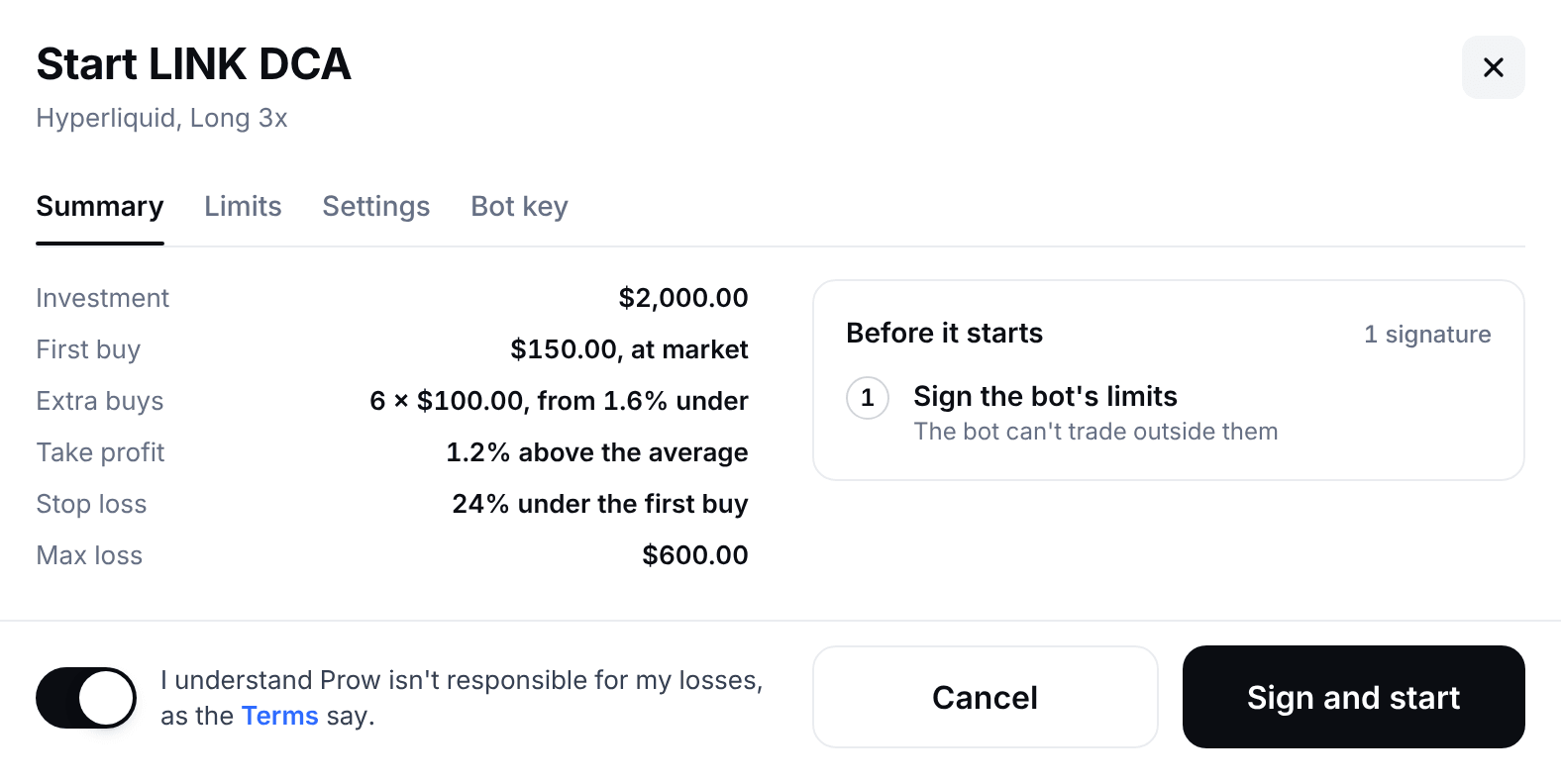
    Continue checks the settings: the minimum investment, the stop and the liquidation price. The review is named after your coin, like Start LINK DCA: Summary lists the investment, the first buy, the extra buys, the take profit, the stop loss and the max loss, and Limits, Settings and Bot key list what you sign. Turn on the risk acknowledgement and press Sign and start, which asks for up to three signatures: Enable bots on Hyperliquid (or Aster) for the first bot on the account, Approve the Prow fee once, and Sign the bot's limits. Prow's servers refuse any order outside those limits. Then Open bot shows the bot's page.

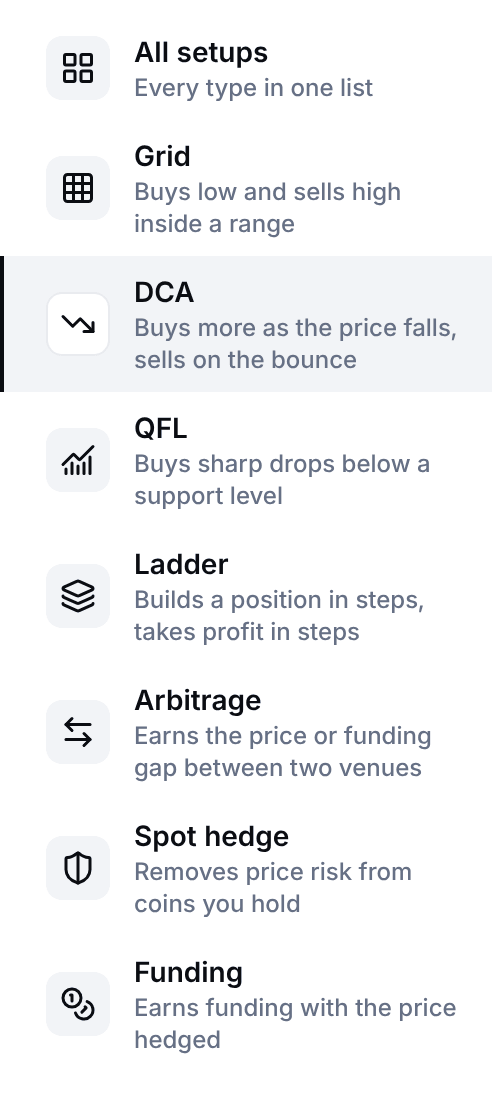
The types of bot that Prow's Start a bot window lists: All setups, Grid, DCA, QFL, Ladder, Arbitrage, Spot hedge and Funding, each with a line of its own, DCA picked with the line Buys more as the price falls, sells on the bounce, and QFL under it with Buys sharp drops below a support level.
Prow's DCA builder: the Hyperliquid account with its balance, a Direction switch with Long picked, the investment with its 25%, 50% and Max chips, the leverage from 1x to 5x with 3x picked, and the three run lengths, with a line saying the settings can be set by hand under Manual adjustment.
Start a bot and the DCA builder on Nov 6, 2026: DCA picked, then the direction, the investment, the leverage and the run length. The figures are a sample account's.
The Start LINK DCA window on its Summary tab: the investment, the first buy, the extra buys, the take profit, the stop loss and the max loss, the signature it needs before it starts, the risk acknowledgement, and the Cancel and Sign and start buttons.
The window a start opens on Nov 6, 2026: what starts, the signature it needs and Sign and start. The figures are a sample account's.

What does a running DCA bot show, and how do I stop it?

The bot's page looks like Trade: the market's chart with the deal's lines and fills, and the bot's panel with its figures and its buttons. Open bot shows it when the bot starts, and My bots lists it after that.

  • The figures

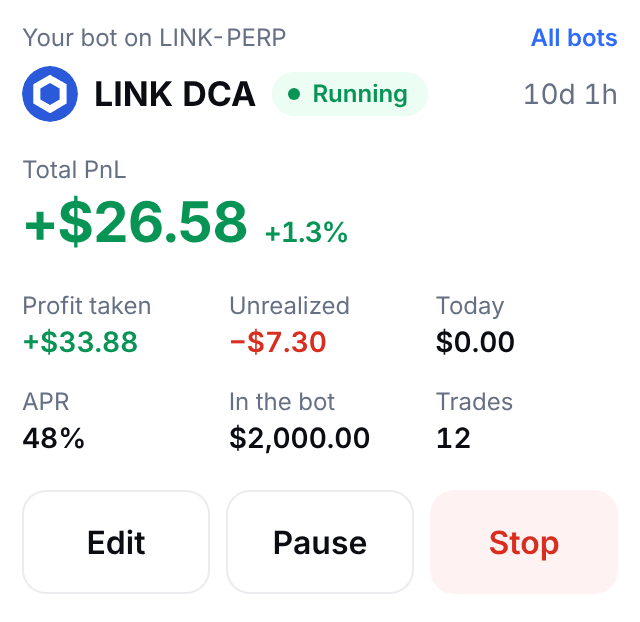
    Total PnL, with Profit taken, Unrealized, Today, APR (after a day), In the bot and Trades. The chart shows the deal's lines: the first buy, each extra buy, the average, the take profit and the stop loss. The Position tab lists the size, entry, mark and liquidation price with how far away it is.

  • Orders and trades

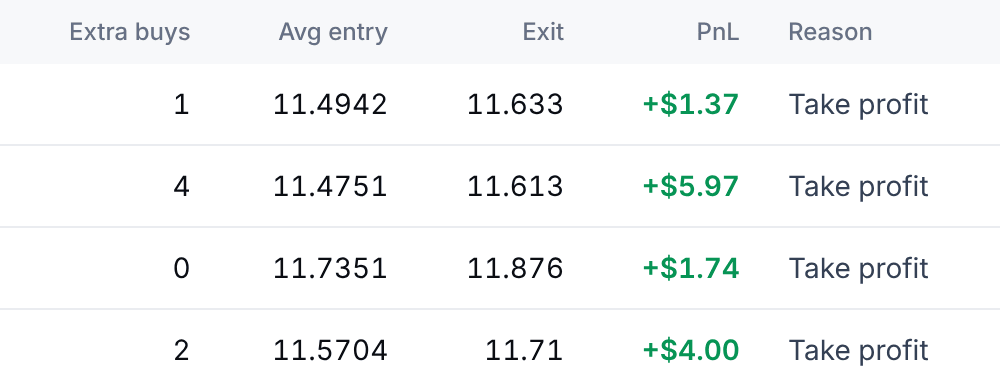
    Orders lists what the bot has on the venue, each with its side, type, price, size, level and status, read-only: cancelling one elsewhere pauses the bot. Trades lists each deal with when it opened and closed, the extra buys it used, its average entry, its exit, its profit and why it closed.

  • Pause, Edit and Stop

    Pause cancels the extra buys and the take profit and keeps the position and the stop. Edit changes the name, the take profit, the trailing take profit, the trailing stop, the cooldown and Repeat; the investment, the orders, the leverage and the stop loss are part of the limits you signed, so to change them you use Copy settings and start a new bot. Stop asks what happens to the position: Close the position at market, Keep the position with its stop, Wait for take profit, then stop or Keep the position without a stop. A spot DCA bot sells the deal's coins, keeps them or waits for the take profit.

  • Renewing

    The limits last 30 days at most. From 3 days before they end the page shows Renew limits: one signature keeps the bot running with the same settings. The Prow Bots key lasts 30 days too, and is renewed with one signature. If either lapses, the bot cancels its extra buys and its take profit an hour before and pauses, with its stop kept on the venue.

The panel of a running DCA bot: its name and status, its total profit and loss, the profit taken, the unrealized profit, the day's profit, the APR, the money in the bot and its number of trades, with the Edit, Pause and Stop buttons.
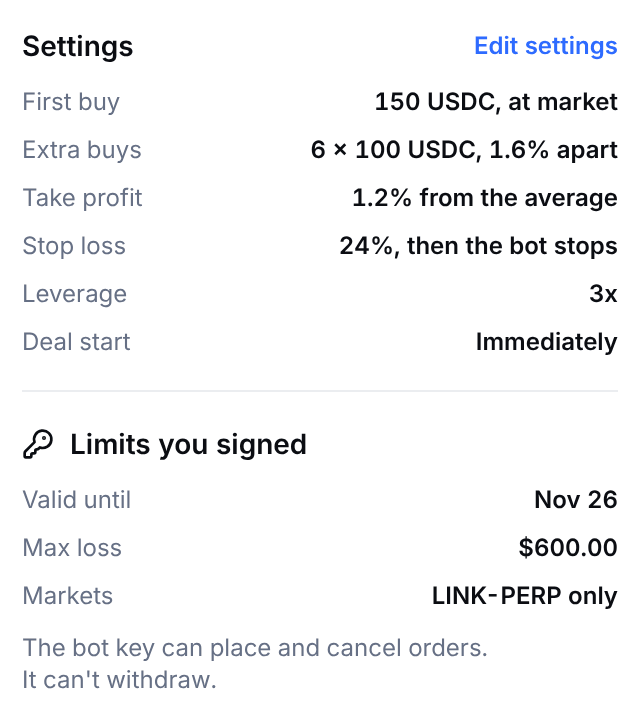
The settings of a running DCA bot and the limits it signed: the first buy, the extra buys, the take profit, the stop loss, the leverage and the deal start, then the date the limits are valid until, the max loss and the market, and a line saying the bot key can place and cancel orders and can't withdraw.
A running DCA bot's panel and its settings on Nov 6, 2026: its profit and loss, its buttons and the limits it signed. The figures are a sample bot's.
Part of the Trades tab of a running DCA bot, a row for each deal: the extra buys it used, its average entry, its exit, its profit and why it closed.
The same bot's Trades tab on Nov 6, 2026: for each deal, its extra buys, average entry, exit and profit. The figures are a sample bot's.
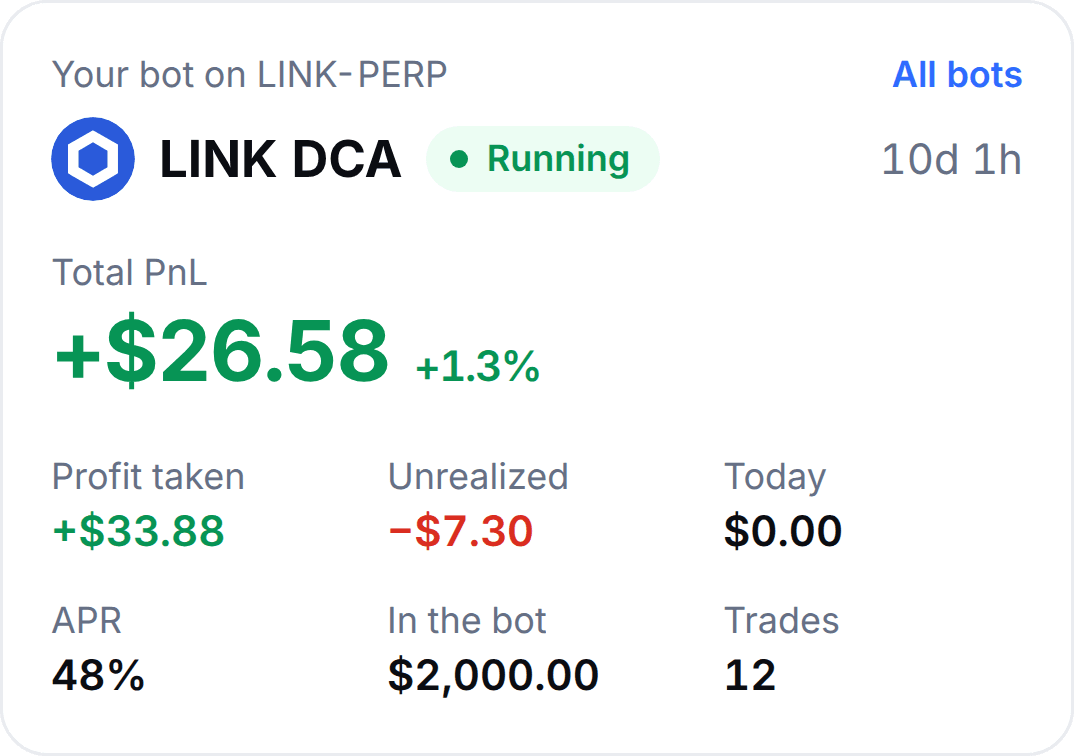
On a phone, the card of a running DCA bot: its name and status, its total profit and loss, the profit taken, the unrealized profit, the day's profit, the APR, the money in the bot and its trades.
On a phone, the same bot on Nov 6, 2026: its profit and loss, the profit taken and its trades. The figures are a sample bot's.
On a phone, the position of a running Long DCA bot on LINK-PERP at 3x: the size, the entry, the mark price, the liquidation price with how far away it is, the profit and loss, and the take profit and stop loss prices.
On a phone, the same bot's position on Nov 6, 2026: its entry, the take profit and the stop loss, and the liquidation price beyond the stop. The figures are a sample bot's.

What do I control, and what can Prow not do with my keys?

Your money stays in your own account. The venue, not Prow, stops the key from withdrawing: it has no withdrawal permission. Prow's servers check every order against the limits you sign, and if they go down, a futures bot's stop stays on the venue. More in the Prow Bots key.

You set

  • The market, the direction and the leverage
  • The investment, the base order and the extra buys
  • The take profit and the stop loss
  • When a deal starts, whether it repeats, and the max loss
  • Pause or stop, at any time

You sign

  • One Prow Bots key for each account, with its first bot. It lasts 30 days and you renew it with one signature.
  • The Prow fee, once for the account.
  • The bot's limits, 30 days at most. Prow's servers refuse every order outside them.

What the key can't do

  • Withdraw your funds
  • Send funds to another address or account
  • Approve another key

The check against your limits runs on Prow's servers, not on the venue. On Aster the key only works from them.

When does a DCA bot not pay?

  • Fees add up

    Every order pays the venue's fee, plus Prow's on every perp fill and every spot sell, and the base order at market and the stop pay the taker rate. A deal that closes on its base order alone makes $1.50 before fees in the example, so fees take a larger share of a small take profit.

  • Leverage multiplies the loss

    Gains and losses both grow with leverage, and liquidation comes closer to the ladder. The builder checks that liquidation would come after your stop and refuses the bot if it could not. 1x is the default, 3x the most on most markets.

  • Funding on futures

    While a deal is open a futures bot pays or collects funding, every hour on Hyperliquid. A deal stuck near the bottom of its ladder for weeks keeps paying it while funding is positive, and the fees come on top.

  • Money is tied up

    The investment has to fund the whole ladder, whether or not it fills, and the bot's resting orders use your account's free balance. If something else uses that money, the bot pauses, and what is in a deal earns nothing while the price sits under its take profit.

A DCA bot wins a little, often, and loses a lot when the price keeps falling past its last extra buy. The stop loss is what caps it.

Questions about the DCA bot

What is a DCA bot, and how does it work?

A DCA bot (dollar-cost averaging) trades in deals. A deal opens with a base order. If the price falls, the bot adds extra buys at set distances under it, which other platforms call safety orders, and each one lowers the average price of what the bot holds. One take profit, a set percentage above that average, sells the whole position, and the next deal starts. It is not a recurring buy: nothing is bought on a schedule. Prow's DCA bot runs on Hyperliquid and Aster perps, Long or Short, and on Hyperliquid spot markets, Long only, with a stop loss that is always on.

Read more: DCA bots on Hyperliquid and Aster: settings that matter, DCA bot in the docs

What are safety orders, and what settings does a DCA bot have?

Safety orders are the extra buys of a deal: orders that rest under the base order and fill as the price falls, each lowering the average. Prow's form calls them extra buys, and extra sells on a Short. The settings are the base order, the number of extra buys and their size, the price deviation (how far under the base order the first extra buy sits), the step scale and the volume scale, the take profit and the stop loss, and on futures the direction and the leverage. The builder starts with 5 extra buys, 2% apart at first, a step scale of 1.2, a volume scale of 1.0, a take profit of 1.5% above the average and a stop loss that follows the ladder (18% with these settings). How many extra buys depends on how far the coin falls: add up how far the ladder reaches (14.88% in the page's example) and ask whether the coin has fallen further than that in recent weeks. If it has, the ladder will run out regularly.

Read more: Every setting, in the docs

DCA bot or grid bot: which should I use?

They suit different markets. A grid bot trades a range: it rests buys under the price and sells above it and earns a step on every swing, so it suits a coin that moves sideways and loses when the price trends out of its range. A DCA bot trades a dip: it buys more as the price falls and sells everything on a bounce, so it suits a coin that falls and recovers and loses when the price keeps falling past its last extra buy. Both run on Hyperliquid and Aster with a stop loss that is always on, and Prow's builder opens either one with the same steps.

Read more: Grid bot, How to run a grid bot on Hyperliquid (no code)

Is a DCA bot profitable, and can it lose money?

Sometimes, and only if the price bounces. A take profit earns a small share of what is in the deal: $8.49 after fees on the $600 of the page's example, with all 6 orders filled. When the price keeps falling instead, the stop closes the deal at a loss of $108.61, about 13 take profits. A DCA bot has no edge of its own: it wins small and often and loses big when it loses, which is why its stop loss is always on. A deal that never reaches its take profit ties up money and pays funding on futures while it waits.

Read more: DCA bots on Hyperliquid and Aster: settings that matter

What is martingale, and is a volume scale above 1 safe?

Martingale means sizing up after a loss. In a DCA bot it is a volume scale above 1: each extra buy is that many times bigger than the one before. At 1.5 in the page's example the 6 orders cost $1,419 instead of $600, a bounce of 7.45% from the last buy reaches the take profit instead of 11.10%, and the stop loses $255.38 instead of $108.00 before fees. It is not safe: the form warns above 1.2 ("Each extra buy is bigger than the last (martingale). Losses grow fast if the price keeps going."), and in Prow's research on past prices martingale DCA without a stop wiped out accounts in most runs. With a stop it did no better than chance.

Read more: DCA bots on Hyperliquid and Aster: settings that matter

Where should the stop loss go?

Beyond the last extra buy, measured from the average. Prow measures the stop from the average entry and moves it as the average moves, so it must sit beyond the next extra buy at every step of the deal, or it fires before the ladder is used: the form shows the smallest stop it allows (10.36% for the page's example, so a stop of 10% is refused and 11% is allowed). The builder starts at how far the extra buys reach plus 3%, rounded up, which is 18% here. A stop further away loses more when it fires, and the max loss, 30% of the investment by default, closes the bot at market if the total loss reaches it first. On futures the stop must also come before liquidation, and the builder refuses a bot where it would not.

Read more: Liquidation price on Hyperliquid and Aster, with examples

What is QFL, and is it the same as a DCA bot?

QFL has the same deals as a DCA bot, with extra buys, a take profit above the average and a stop loss, and starts them differently: it opens a deal when the price cracks under its base, a recent low the price already bounced from, and then works the bounce. It starts with a crack of 3% under the base, and a market that only falls has no base, so it never opens deal after deal in a free fall. QFL is Long only, and it has its own entry in Start a bot, which shows where each coin on Hyperliquid stands against its 2-day base.

Read more: DCA bot in the docs

Can the bot withdraw my money?

No. It trades with a key called Prow Bots. The key can place and cancel the bot's orders and set leverage, but it cannot withdraw, send funds to another address or account, or approve another key. On Aster it can also move funds between your own spot and futures balances, which Prow's servers never do for a bot. Prow's servers check every order against the limits you sign for the bot and refuse the rest, and on futures the bot's stop loss rests on the venue. The key expires after 30 days unless you renew it with one signature, and on Aster it only works from Prow's servers.

Read more: The Prow Bots key, Hyperliquid agent wallets: why a trading key can't withdraw

What does the DCA bot cost?

The venue's fee on every fill, plus Prow's fee on every perp fill the bot makes: 0.025% on Hyperliquid and 0.01% on Aster. On Hyperliquid spot Prow's fee is on sells only, never on buys. The base order is a market order and pays the taker rate unless you set it as a limit order, the extra buys and the take profit rest on the order book and pay the maker rate, and the stop is a taker order. On Hyperliquid at the base tier a deal in the page's example that closes at its take profit costs $0.51 (0.045% on the base order, 0.015% on the other orders and 0.025% to Prow on each) out of $9.00. There is no subscription. Prow's 0% launch fee, until Dec 31, 2026, is for orders you place yourself in the app: a bot pays the fee from its first fill. A futures bot also pays or collects funding while a deal is open. Every order is at least the venue's smallest, on Hyperliquid $10, and the builder asks for 10% more, so the ladder needs at least that many times its number of orders: the builder shows the minimum investment for your settings.

Read more: Fees

Can I use it today?

Bots are switched on account by account. Any Prow account can open the builder, but starting a DCA bot needs bots switched on for your account. If they are not, Continue stays off and nothing is signed or placed. You also need a Hyperliquid or Aster account linked in Prow with free margin for the bot, or USDC in your Hyperliquid spot balance for a spot DCA bot.

Read more: DCA bot in the docs