Skip to content

Spot hedge bot for Hyperliquid

Prow's Spot hedge holds a short on Hyperliquid, the same size as the coins you hold, so their price stops moving your balance. The short also collects funding while longs pay it.

  • Hyperliquid
  • Never trades your coins
  • The key can't withdraw

Bots are switched on account by account. Any Prow account can open the builder.

Short on
Hyperliquid perps
Your coins
Never bought or sold
Leverage
1x or 2x, isolated
Guard stop
Before liquidation
The key
Can't withdraw
Prow's fee
0.025% a trade

What is the Spot hedge for?

It is for coins you want to keep through a rough stretch without selling them. It is not a yield product: funding can turn negative, and then the short pays. The bot runs on Prow's servers around the clock, so nothing has to stay open on your device.

Coins you don't want to sell

Keep the coins where they are: on Hyperliquid spot, in a wallet or on an exchange. The bot opens a short of the same size, so a fall in the price is paid back by the short.

Funding on top

Usually more traders are long than short, and longs pay shorts every hour on Hyperliquid. The short collects that, which can cover its fees and a little more. When the rate turns negative the short pays, and the bot tells you.

A short you can read

One short, one guard and one liquidation price, drawn on the chart and listed on the bot's page. A notice says when the margin runs low and how much USDC to add. The bot never trades your coins and never moves money.

How does a spot hedge work?

A perp, short for perpetual future, is a contract on a coin's price with no end date. A short gains when the price falls and loses when it rises. Hold a coin and a short of the same size, and the price moves cancel: when the price falls 10%, your coins lose about what the short gains. That is called a hedge, or being delta neutral.

A perp also pays funding, a small payment between longs and shorts on a schedule. When the rate is positive, longs pay shorts. Hyperliquid pays it every hour, and at its resting rate that is 0.00125% an hour, about 11% a year on the short's value. The rate follows the market and can turn negative, and then the short pays.

The hedge protects the value of your coins in dollars, not their number, and only for the size you hedge. You keep the coins and their other risks. The short needs margin on Hyperliquid and can be liquidated, which the sections below cover.

$10,000 of coins and a short of the same size, drawn out

What the coins, the short and the two together gain or lose when the price falls, stays and rises
If the pricefalls 10%staysrises 10%
Your coins−$1,000$0+$1,000
The short+$1,000$0−$1,000
Together$0$0$0

Whatever the price does, the short collects funding while the rate is positive:

$3.00 a day

at Hyperliquid's resting rate, 0.00125% an hour on $10,000

Opening and closing the short costs about $14.00 in fees, $9.00 to Hyperliquid at base rates and $5.00 to Prow. 30 days of funding at that rate is $90.00, which leaves +$76.00 before slippage.

What does the bot do once it starts?

Four things, and nothing else. It never buys or sells your coins and never moves money.

  1. 01

    It opens the short once

    With orders that cross the order book at most your max slippage from the price, 0.5% by default, isolated at 1x or 2x. If the book does not have the whole size within that limit, it tries again every few seconds, and after 5 tries in a row without the short growing it pauses.

  2. 02

    Then it only holds it

    It never adds to the short, never trades your coins and never moves money. A short closed by the guard or by Hyperliquid is not opened again.

  3. 03

    A guard closes it before liquidation

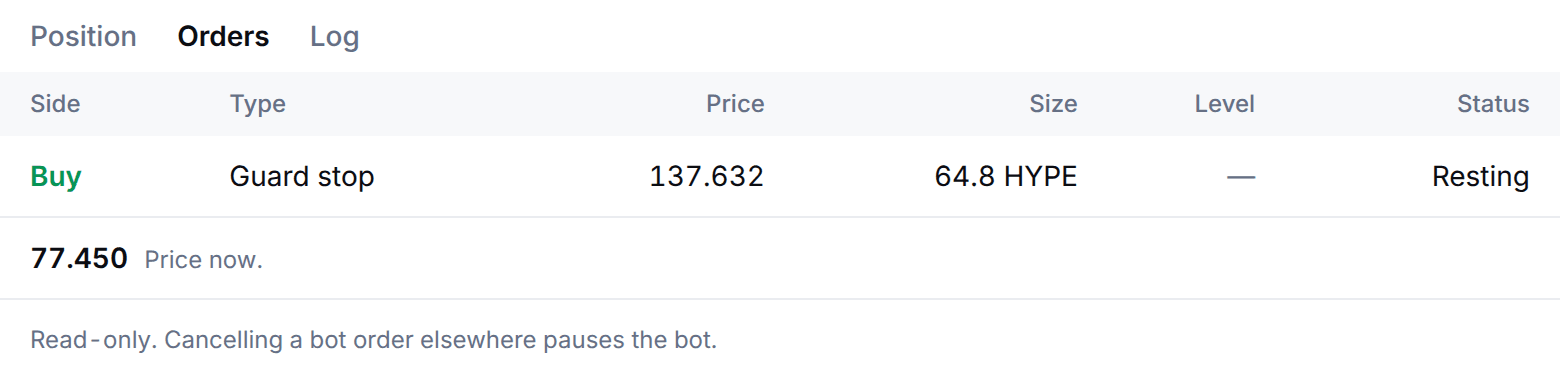
    A stop on Hyperliquid at 85% of the way from your entry to the liquidation price by default (50% to 90%, or off). It rests on Hyperliquid as an order, so it can still fire if Prow's servers are down. If the price gets there, it closes the short, keeps what is left of the margin and tells you at once. Add margin on Hyperliquid and the guard follows the new liquidation price. The Orders tab lists it, read-only: cancelling a bot order elsewhere pauses the bot.

  4. 04

    It watches margin and funding

    You get a notice when the liquidation price comes within 15% of the price, and an urgent one at half of that, with how much USDC to add. Another notice comes when the short has paid funding over a day, and one when your spot on Hyperliquid falls below the short.

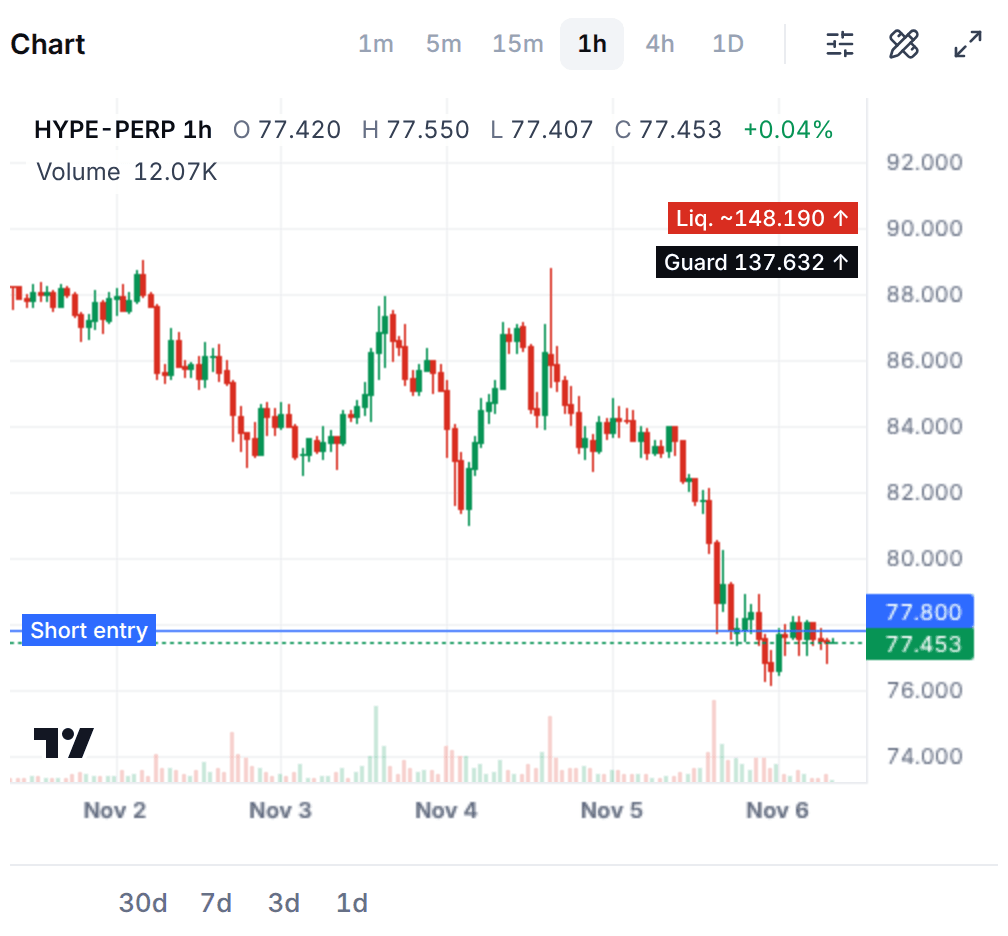
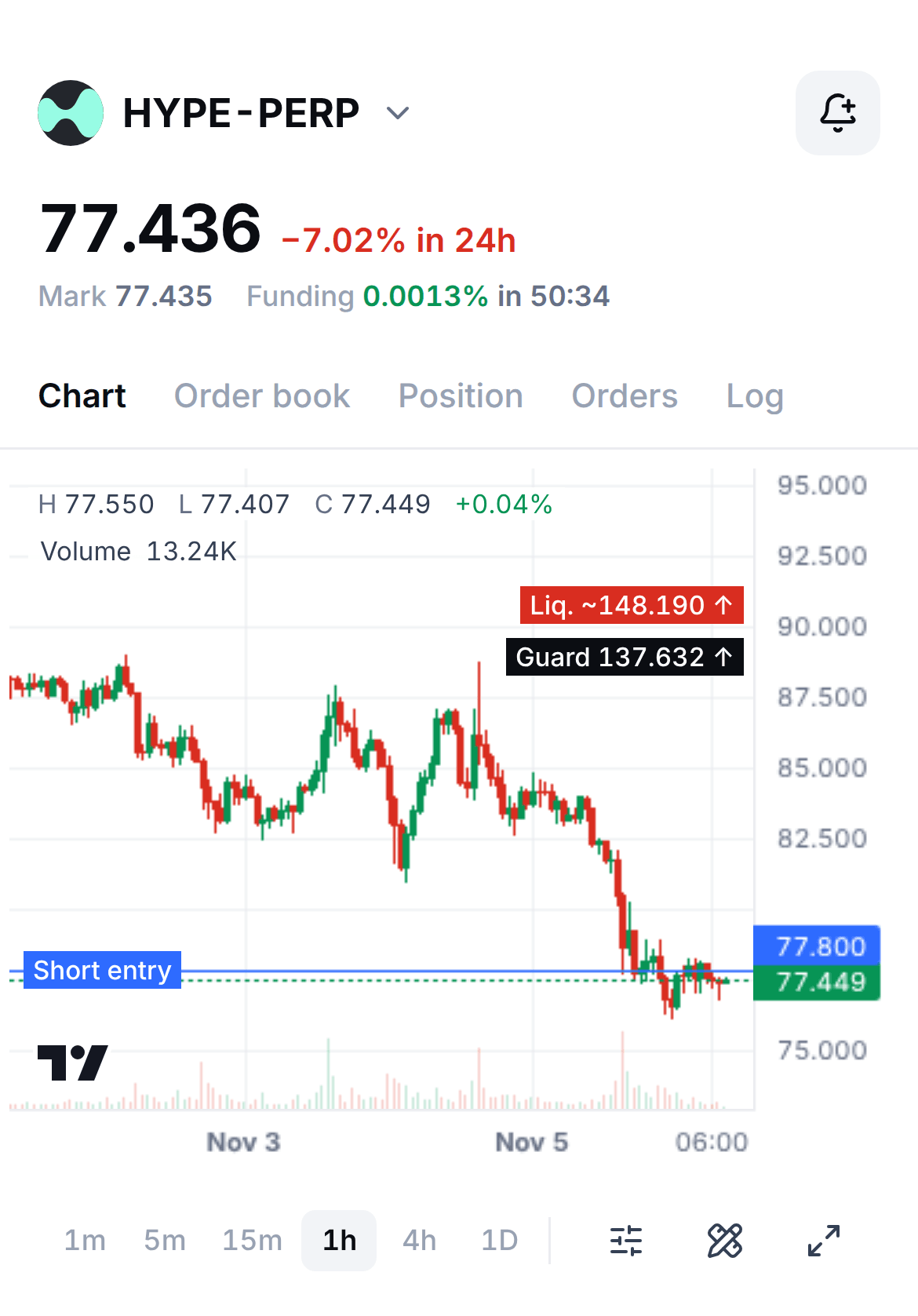
The chart of a running Spot hedge on its coin's perp: candles, the short's entry as a line near the price, and the guard and the liquidation price as labels far above it.
A running Spot hedge's chart on Nov 6, 2026: the short's entry, the guard and the liquidation price. The figures are a sample account's.
The Orders tab of a running Spot hedge: one resting buy order, the guard stop, with its price and size, the price now and a note that the tab is read-only.
The Orders tab on Nov 6, 2026: the guard stop, resting on Hyperliquid. The figures are a sample account's.
On a phone, the top of a running Spot hedge's page: the coin's perp, its price and funding, the tabs, and the chart with the short's entry, the guard and the liquidation price.
On a phone, a running Spot hedge's chart on Nov 6, 2026: the short's entry, the guard and the liquidation price. The figures are a sample account's.

What do the numbers look like?

Both examples hold $10,000 of coins and a short of the same size. Opening and closing the short is two trades, and funding has to pay for both before it earns anything. The price does not change the result: it moves the coins and the short by the same amount.

  • $14.00

    To open and close

    Each way the short pays Hyperliquid's taker fee (0.045%, $4.50) and Prow's fee (0.025%, $2.50). Slippage comes on top, at most 0.5% by default on an order and usually far less. Your own fee tier may be lower.

  • $3.00

    A day of funding at the resting rate

    Hyperliquid's funding sits at 0.00125% an hour unless demand moves it, which is about 11% a year on the short. The short collects it while the rate is positive.

  • about 5 days

    To earn the fees back

    At the resting rate, $14.00 of fees takes that long to earn back. A short held for a week or less leaves little after fees, before slippage.

Funding at its resting rate

Hyperliquid's baseline: the rate sits here when demand does not move it.

Size
$10,000 of coins and a short of $10,000
Funding, paid to the short
0.00125% an hour
A year at that rate
about 11% of the short's value
It collects
$3.00 a day
Fees to open and close
$14.00: $9.00 to Hyperliquid at base rates and $5.00 to Prow
Fees paid back in
about 5 days
What the price does
Moves the coins and the short by the same amount, so the result is the same
Funding at its resting rate: the funding and what is left after all the fees, by how long it lasts
If it lastsFundingAfter fees
1 day+$3.00−$11.00
7 days+$21.00+$7.00
30 days+$90.00+$76.00
90 days+$270.00+$256.00

Slow, and positive. After 30 days the short has collected $90.00 and the fees took $14.00, which leaves $76.00. The price moved your coins either way, and the short moved the other way by the same amount.
Funding turns negative

Shorts crowd in and the rate falls below zero: the short pays longs instead.

Size
$10,000 of coins and a short of $10,000
Funding, paid by the short
0.00125% an hour
A year at that rate
about 11% of the short's value
It pays
$3.00 a day
Fees to open and close
$14.00: $9.00 to Hyperliquid at base rates and $5.00 to Prow
Fees paid back in
Not while funding stays negative
What the price does
Moves the coins and the short by the same amount, so the result is the same
Funding turns negative: the funding and what is left after all the fees, by how long it lasts
If it stays negative forFundingAfter fees
1 day−$3.00−$17.00
3 days−$9.00−$23.00
7 days−$21.00−$35.00
14 days−$42.00−$56.00

The hedge keeps protecting your coins, and costs $3.00 a day while this lasts. The bot does not close it by itself: it sends a notice once the short has paid over 24 hours, and you decide whether to stop it.

The yearly figure (about 11%) is what the short would collect if the rate never changed. It always changes. It is a share of the short's value, and the margin you put up is a share of that value too: all of it at 1x, half at 2x.

How do I start a Spot hedge in Prow?

You need a Hyperliquid account linked in Prow, with free margin in USDC for the short: all of its value at 1x, half of it at 2x. Your coins can be on Hyperliquid spot, where Prow reads the balance, or anywhere else, where you type the amount. One bot can run on a coin's perp on an account at a time.

  1. 01

    Open Bots, press Start a bot and pick Spot hedge

    Spot hedge is in the list of bot types. It says it removes price risk from coins you hold.

  2. 02

    Pick your coin

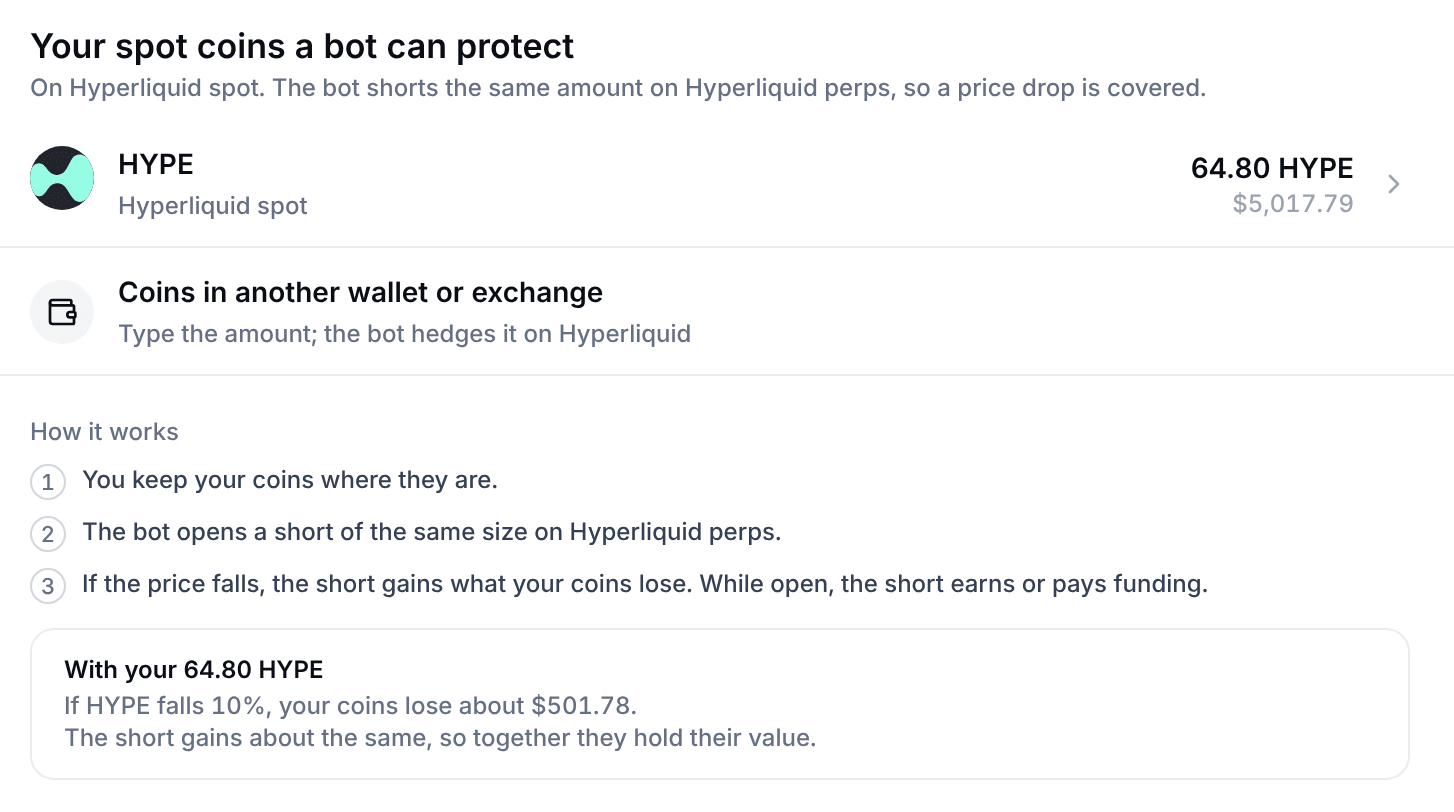
    Your spot coins a bot can protect lists the coins in your Hyperliquid spot balance worth at least $10, each with its amount and its value. Tap one. For coins held elsewhere press Coins in another wallet or exchange, and pick the coin in the builder.

  3. 03

    Say where your coins are and how many

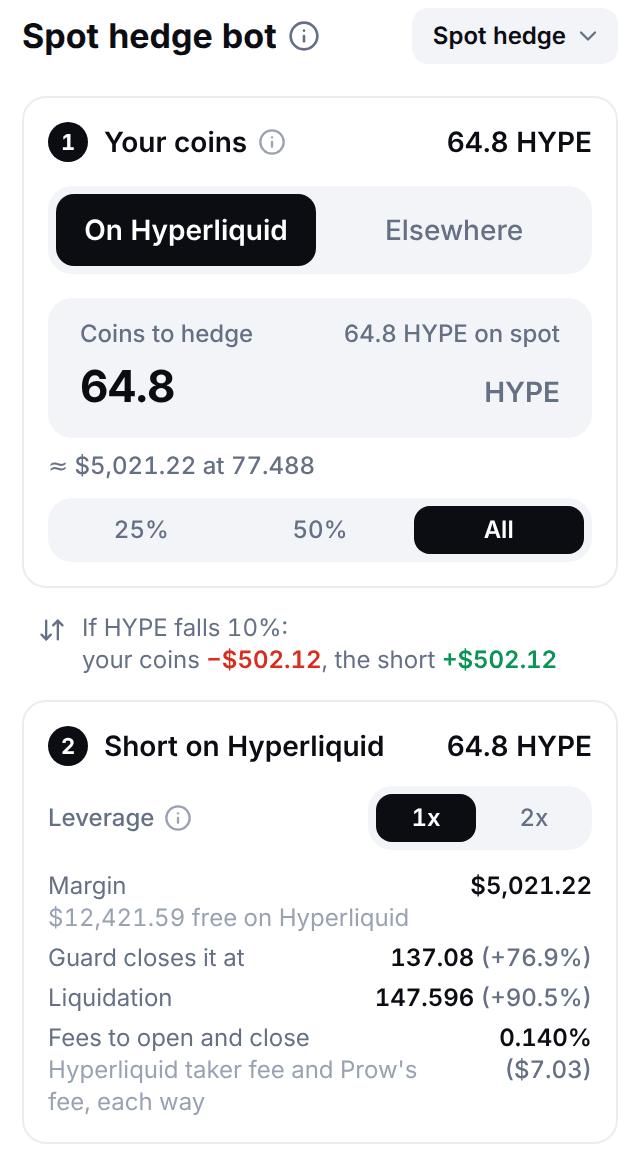
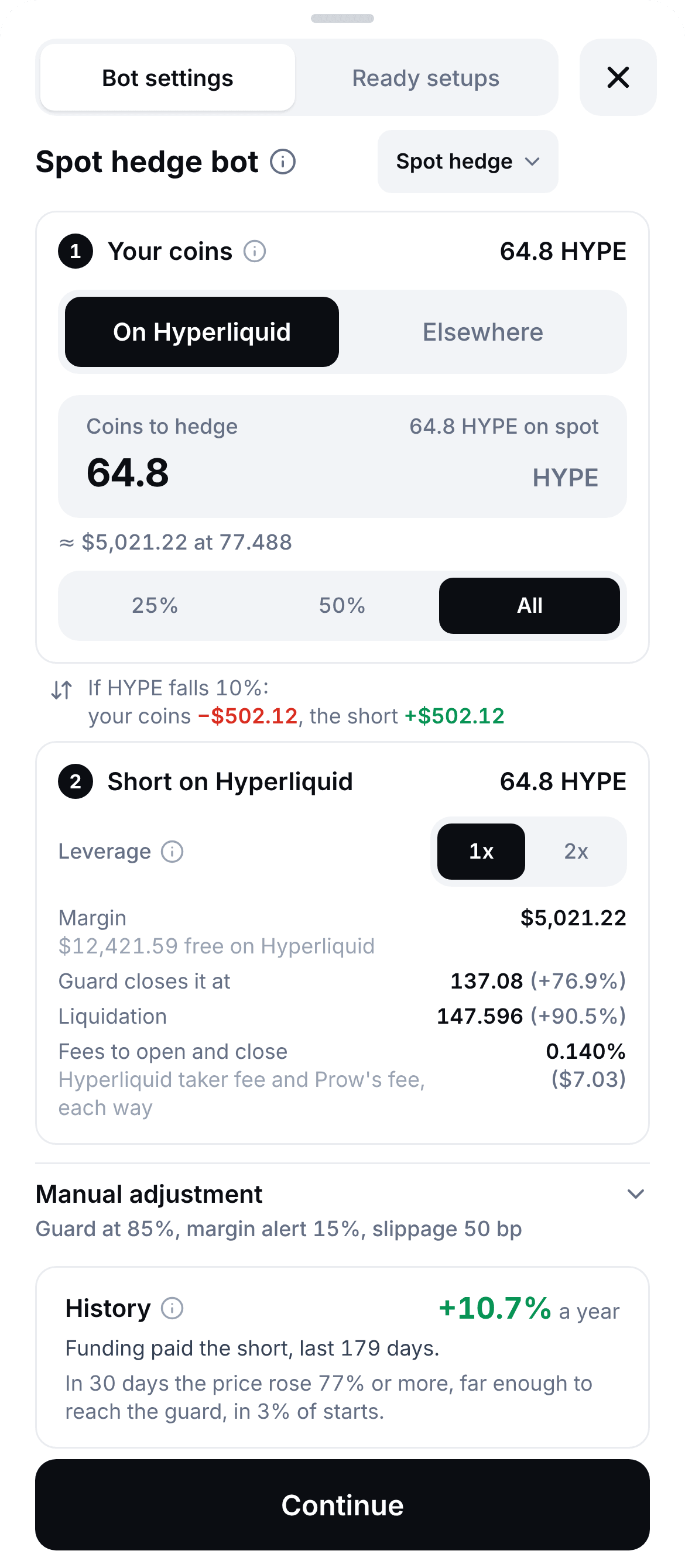
    Where your spot is is On Hyperliquid or Elsewhere. On Hyperliquid the bot reads your balance of the coin and fills in all of it; 25%, 50% and All change the share. Elsewhere you type the amount under Coins to hedge. A smaller amount is a partial hedge. Under it the builder shows what a 10% fall does: your coins lose an amount and the short gains the same.

  4. 04

    Choose the leverage

    Leverage is 1x by default, or 2x, always isolated. At 1x the short puts up its whole value as margin, and a rise of about 95% would liquidate it. At 2x it puts up half, and about 45% would.

  5. 05

    Read the short before you start

    Under the leverage the panel lists:

    • Margin, what the short puts up, and how much USDC is free on Hyperliquid
    • Guard closes it at, the price where the guard stop closes the short, and how far above today's price it is
    • Liquidation, Hyperliquid's price for the short, and how far above
    • Fees to open and close, Hyperliquid's taker fee and Prow's, each way

    Manual adjustment sums up the guard, the margin alert and the slippage. The History card shows the coin's funding over the last 180 days or so, as a year of it, and how often a 30-day rise reached the guard.

  6. On a phone, the Spot hedge builder as a sheet: your coins and how many to hedge, the leverage, the margin, the guard and liquidation prices, the fees, Manual adjustment, the History card and the Continue button.
    On a phone, the Spot hedge builder on Nov 6, 2026: your coins, the short, its guard and liquidation price, and the coin's funding history. The figures are a sample account's.
  7. 06

    Press Continue and read before you sign

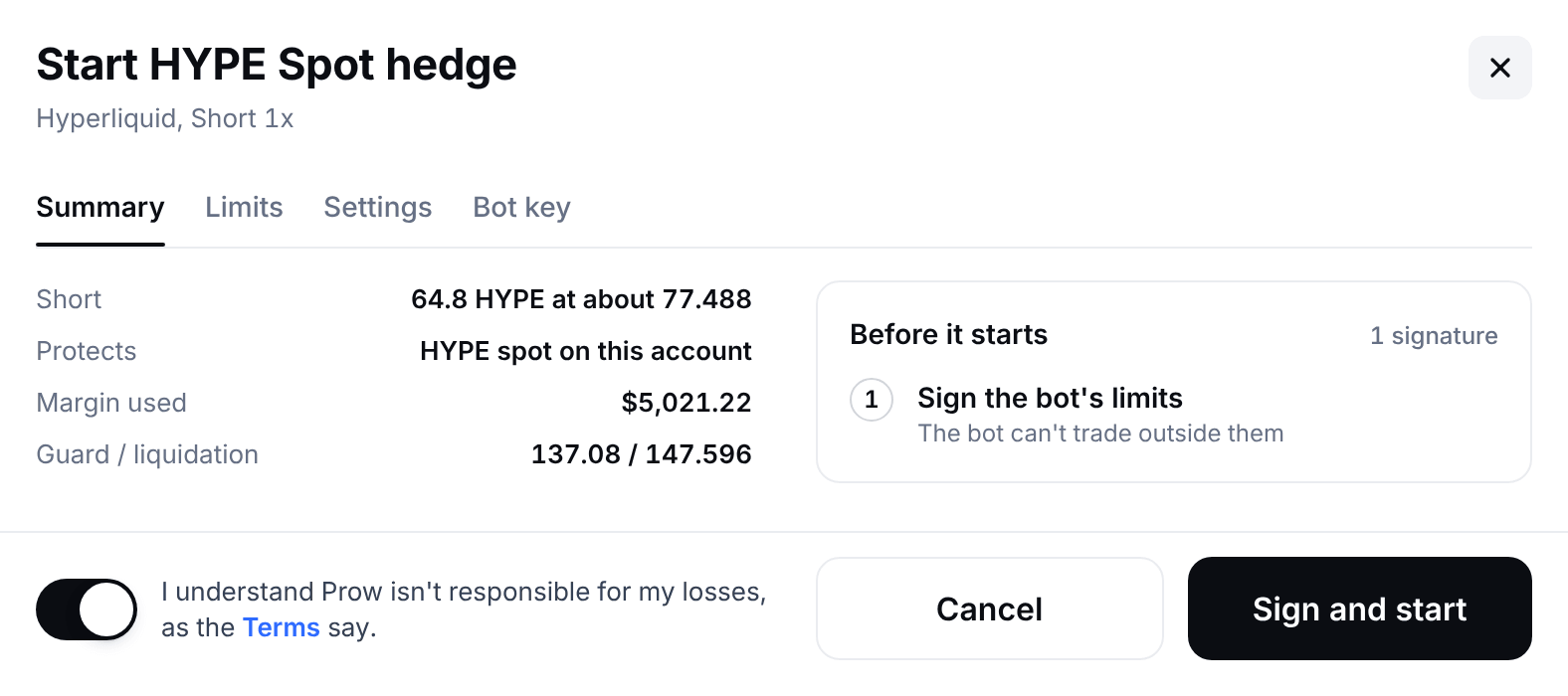
    The next screen is named after your coin, like Start HYPE Spot hedge. Summary lists the short, what it protects, the margin used and the guard and liquidation prices. Limits, Settings and Bot key list what you sign, every setting and what the key can do. Tick the risk acknowledgement, which sits under every tab.

  8. 07

    Press Sign and start

    Before it starts lists the signatures it needs, up to three: Enable bots on Hyperliquid for the first bot on the account, Approve the Prow fee once, and Sign the bot's limits. Prow's servers refuse any order outside those limits. When the bot starts, Open bot shows its page.

Prow's Start a bot window on Spot hedge: the coins of a Hyperliquid spot balance that a bot can protect, each with its amount and its value, a line for coins in another wallet or exchange, three lines on how it works and what a 10% fall does to your own coins.
Start a bot, Spot hedge, on Nov 6, 2026: the coins of a Hyperliquid spot balance a bot can protect, and a line for coins held elsewhere. The figures are a sample account's.
Prow's Spot hedge builder: the Your coins card with where the spot is and how many coins to hedge, what a 10% fall does to the coins and to the short, and the Short on Hyperliquid card with the leverage, the margin, the price where the guard closes the short, the liquidation price and the fees to open and close.
The Spot hedge builder on Nov 6, 2026. The figures are a sample account's.
The Start Spot hedge window: the short, what it protects, the margin used and the guard and liquidation prices, the signatures it needs before it starts, the risk acknowledgement, and the Cancel and Sign and start buttons.
The window a start opens on Nov 6, 2026: what starts, the signatures it needs, the acknowledgement and Sign and start. The figures are a sample account's.

What does a running hedge show, and how do I stop it?

The bot's page looks like Trade: the coin's chart with the short drawn on it, and the bot's panel with its figures and its buttons. Open bot shows it when the hedge starts, and My bots lists it after that.

  • The figures

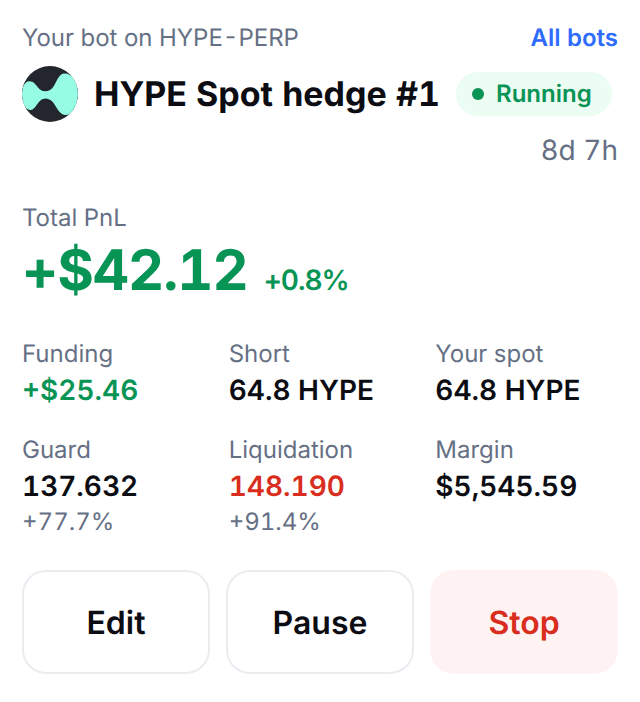
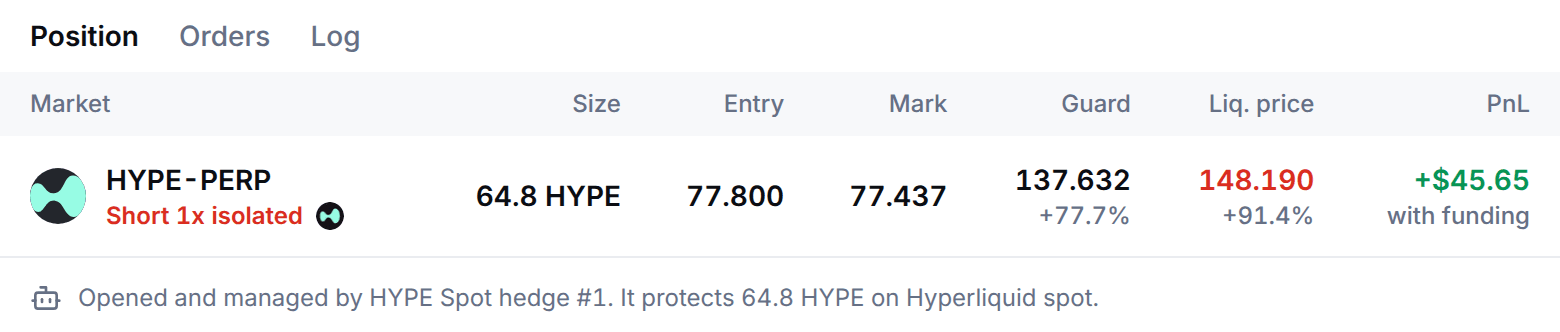
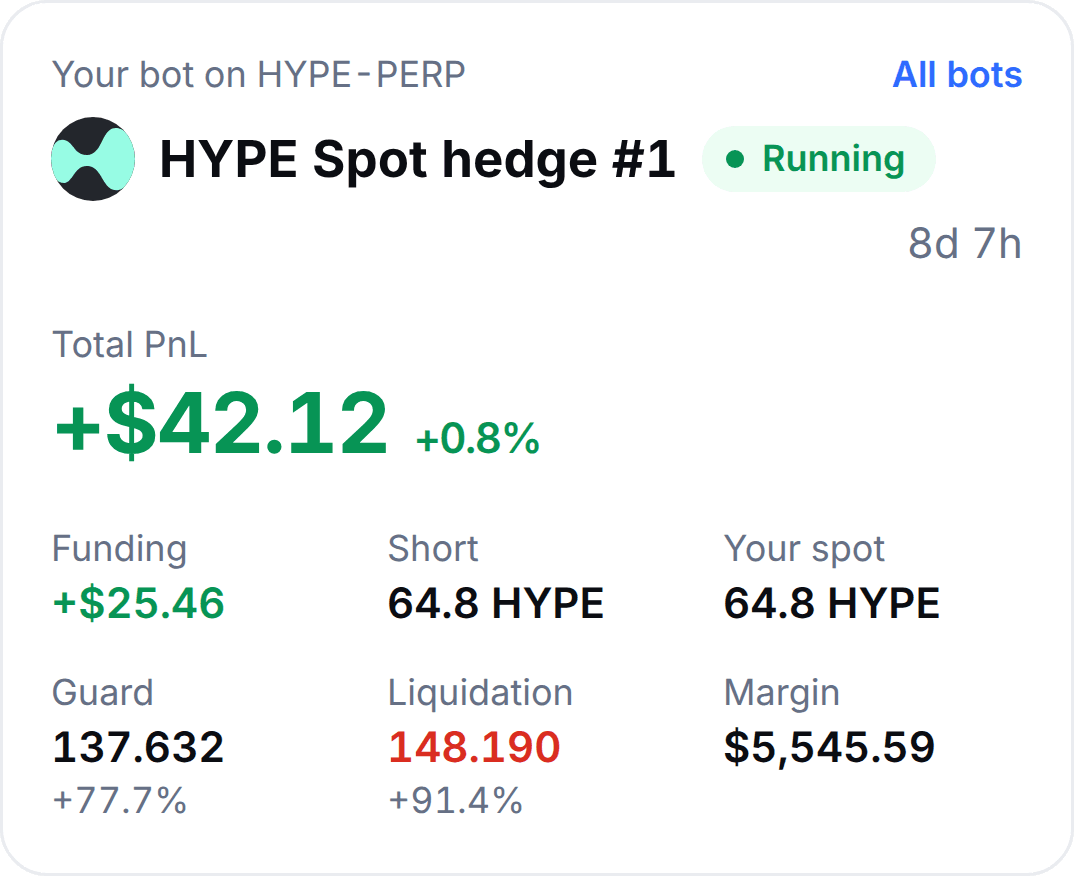
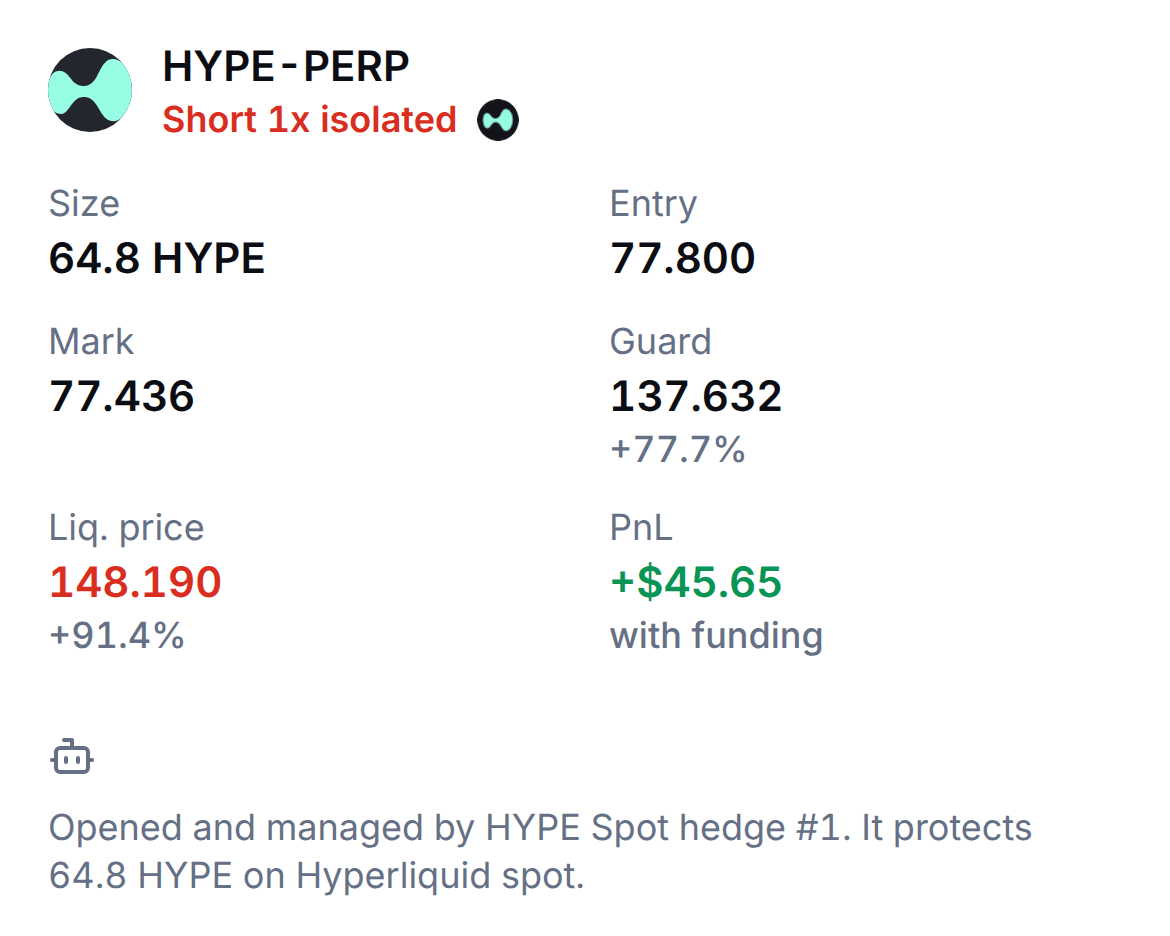
    Total PnL, Funding (what the short collected), Short, Your spot, Guard, Liquidation and Margin. The Position tab lists the short's size, entry and mark, its guard and liquidation price with how far each is, and its profit and loss with funding. Liquidation is Hyperliquid's own figure once Prow has read it, and an estimate marked est. before.

  • The notices

    A red banner and a notice when the liquidation price comes close. An amber banner when the short is paying funding, and when your spot on Hyperliquid is below the short.

  • Pause, Edit and Stop

    Pause keeps the short and its guard on Hyperliquid and opens nothing new. Edit changes the name and the alerts; the size, the leverage and the guard are part of the limits you signed, so to change them you stop the hedge and start a new one. Stop asks what happens to the short: Close the short at market, which leaves your coins unhedged, Keep the short with its guard, or Keep the short without a stop.

  • Renewing

    The limits last 30 days at most. From 3 days before they end the page shows Renew limits (1 signature). If they lapse, the bot pauses an hour before the end, and the short and its guard stay on Hyperliquid. The Prow Bots key lasts 30 days too, and is renewed with one signature.

The panel of a running Spot hedge: its name and status, its total profit and loss, the funding it collected, the short, your spot, the guard, the liquidation price and the margin, and the Edit, Pause and Stop buttons.
A running Spot hedge's panel on Nov 6, 2026. The figures are a sample account's.
The Position tab of a running Spot hedge: the market, the short at 1x isolated, its size, entry and mark, the guard and the liquidation price with how far each is from the price, and the profit and loss with funding.
The Position tab on Nov 6, 2026: the short, its guard and its liquidation price. The figures are a sample account's.
On a phone, the card of a running Spot hedge: its name and status, its total profit and loss, the funding it collected, the short, your spot, the guard, the liquidation price and the margin.
On a phone, a running Spot hedge on Nov 6, 2026: the short, the funding it collected, the guard and the liquidation price. The figures are a sample account's.
On a phone, the Position tab of a running Spot hedge: the short at 1x isolated, its size, entry and mark, the guard and the liquidation price, and the profit and loss with funding.
On a phone, the Position tab on Nov 6, 2026: the short, its guard and its liquidation price. The figures are a sample account's.

What do I control, and what can Prow not do with my keys?

Your coins and your money stay in your own accounts. The venue, not Prow, stops the key from withdrawing: it has no withdrawal permission. Prow's servers check every order against the limits you sign, and if they go down, the short and its guard stay on Hyperliquid. More in the Prow Bots key.

You set

  • Which coin, and whether your spot is on Hyperliquid or elsewhere
  • How many coins to hedge, all of them or a part
  • Leverage, 1x or 2x, isolated
  • The guard, from 50% to 90% of the way to liquidation, or off
  • The margin alert, from 5% to 50%, and whether it says how much to add
  • Max slippage on the opening and closing orders, from 0.1% to 1%
  • Pause or stop, at any time

You sign

  • One Prow Bots key for the Hyperliquid account, with the first bot. It lasts 30 days and you renew it with one signature.
  • The Prow fee on Hyperliquid, once for the account.
  • The hedge's limits, 30 days at most: short only, the most margin, the highest leverage, the max loss, where the guard may sit, the price range and the highest Prow fee. Prow's servers refuse every order outside them. You renew them with one signature on the bot's page.

What the key can't do

  • Withdraw your funds
  • Send funds to another address or account
  • Approve another key
  • Add margin to the short. A notice says how much to add on Hyperliquid, and you add it.

The bot never buys or sells your coins. Coins held elsewhere it cannot see, so it cannot tell if you sell them.

When does the Spot hedge not help?

  • Funding turns negative

    The short pays instead of collecting. The bot sends a notice once it has paid over 24 hours and keeps the hedge on, so stopping it is your call. In Prow's research of 25 coins the short paid funding on about 1 day in 7 for the median coin, and for long stretches on a few.

  • The short is closed or liquidated

    A fast rise uses up the short's margin, and your coins' gain does not add to it. At 1x a rise of about 95% would liquidate it, at 2x about 45%, and the guard closes it before, at 85% of the way by default. Your coins are then unhedged. In Prow's research a 30-day rise reached liquidation in about 4% of starts at 1x and 15% at 2x.

  • Fees

    Opening and closing cost about 0.14% of the short before slippage, $14.00 on $10,000. At Hyperliquid's resting funding that takes about 5 days to earn back, so a hedge held for a week or less leaves little.

  • The upside goes too

    On a rise your coins gain and the short loses about the same, so the part you hedged gains nothing. Hedge a part of your coins to keep part of the move.

  • Margin ties up cash

    The short needs free USDC on Hyperliquid on top of your coins: all of its value at 1x, half at 2x. That cash sits in the short while the hedge runs, and the bot cannot add to it. When a rise eats into it, you add margin yourself.

  • Your coins are not touched

    The bot never buys or sells them, so it protects them from the price and nothing else. BTC, ETH and SOL on Hyperliquid spot are bridged tokens: if the bridge failed they could lose their peg while the short follows the real price. HYPE is native.

  • The sizes drift apart

    The short stays the size you signed. Sell some of your coins or buy more and the hedge no longer matches. On Hyperliquid spot the bot sends a notice when your spot falls below the short; coins held elsewhere it cannot see. Stop the hedge and start a new one with the new size.

  • It removes the price risk of the coins it covers and adds the risks above.

Questions about the Spot hedge

How do I hedge my crypto without selling it?

Open a short of the same size as your coins. A short gains when the price falls and loses when it rises, so it cancels what your coins do while you keep them. That is a spot hedge. By hand you open the short on a perp, watch its liquidation price, add margin when a rise eats into it and watch funding. Prow's Spot hedge does the short and the watching on Hyperliquid: it opens the short once, rests a guard stop before the liquidation price and sends you notices. It never buys or sells your coins.

Read more: Cash and carry trade in crypto: Hyperliquid spot and perp, Spot hedge in the docs

Does hedging mean giving up the upside?

Yes, for the size you hedge. When the price rises your coins gain and the short loses about the same, so the part you hedged gains nothing. Hedge all your coins and your balance stays close to where it was when the short opened. Hedge half and you keep half of the move, up or down. Coins to hedge sets the size: 25%, 50% and All fill in a share of what you hold on Hyperliquid, or you type any amount.

Does the short earn funding, and what if funding turns negative?

Funding is a small payment between longs and shorts on a perp. When the rate is positive, longs pay shorts, so the short collects it. Hyperliquid pays it every hour, and its resting rate of 0.00125% an hour is about 11% a year on the short's value. The rate follows the market and can turn negative, and then the short pays. The bot sends a notice once the short has paid over 24 hours and keeps protecting your coins until you stop it. In Prow's research of 25 coins the short paid funding on about 1 day in 7 for the median coin, and for long stretches on a few.

Read more: Hyperliquid funding rates: how hourly funding works, Funding rates now, by venue

Can the short be liquidated, and what happens to my coins?

Yes. The short is isolated, so a rise uses up its own margin, and your coins' gain does not add to it. At 1x a rise of about 95% would liquidate it, at 2x about 45%. The guard stop closes it before that, at 85% of the way to liquidation by default, and tells you at once. You also get a notice when the liquidation price comes within 15% of the price, with how much USDC to add on Hyperliquid. Either way your coins stay yours, unhedged, and the bot does not open the short again. In Prow's research a 30-day rise reached liquidation in about 4% of starts at 1x and about 15% at 2x.

Read more: Liquidation price on Hyperliquid and Aster, with examples, Is delta neutral risk-free? How hedged trades lose money

How much money do I need?

Your coins, plus free margin in USDC on your Hyperliquid account for the short: all of its value at 1x, half of it at 2x. A hedge of $1,000 of coins needs $1,000 of margin at 1x and $500 at 2x. The builder shows the margin and how much is free, and Continue stays off when it is not enough. The bot cannot move funds, so deposit first. Hyperliquid's minimum order is $10 and the builder asks for 10% more, so the smallest hedge is about $11. One bot can run on a coin's perp on an account at a time.

Can the bot withdraw my money?

No. It trades with a key called Prow Bots. The key can place and cancel the bot's orders and set leverage, but it cannot withdraw, send funds to another address or account, or approve another key. The bot does not add margin for you either: a notice tells you how much to add on Hyperliquid. Withdrawals always need your own wallet. The key expires after 30 days unless you renew it with one signature.

Read more: The Prow Bots key, Hyperliquid agent wallets: why a trading key can't withdraw

What does the Spot hedge cost?

Hyperliquid's taker fee (0.045% at the base tier) and Prow's fee (0.025%) on the short's opening and closing orders: about 0.14% of the short in all, $14.00 on $10,000, before slippage. There is no subscription. Funding is not a fee: the short collects it or pays it. Prow's 0% launch fee, until Dec 31, 2026, is for orders you place yourself in the app: a bot pays the fee from its first fill.

Read more: Fees

Can I hedge coins that are not on Hyperliquid?

Yes, if the coin has a perp on Hyperliquid that Prow's bots are open on. Pick Elsewhere under Where your spot is, or Coins in another wallet or exchange in the Start a bot window, and type the size. The coins can sit in a wallet or on any exchange. Prow cannot see that spot, so keep the two in step yourself and stop the hedge if you sell, or the short becomes a bet on the price falling. On Hyperliquid spot the bot reads your balance and warns you if it drops below the short.

How is it different from hedging on Binance or OKX?

Binance's funding rate arbitrage bot buys the coin itself and shorts its perp, with the funds held on the exchange. OKX offers spot hedging inside its portfolio margin mode, which asks for $10,000 of net assets and derivatives experience. Prow's Spot hedge starts from coins you already hold, wherever they are, and adds only the short, on Hyperliquid, from your own account, with a key that can't withdraw. It places no spot order. Checked on Nov 6, 2026.

Read more: Binance's funding rate arbitrage bot, OKX's spot hedging

Can I use it today?

Bots are switched on account by account. Any Prow account can open the builder, but starting a hedge needs bots switched on for your account. If they are not, Continue stays off, nothing is signed or placed, and the History card says Bots aren't available on your account. You also need a Hyperliquid account linked in Prow with free margin in USDC for the short.

Read more: Spot hedge in the docs